Platform
One system. Every chair, every patient.
Replace the register, the billing software, the reminder app and the overworked front desk with a single OS that knows your clinic end to end.
Tour the modules
One continuous clinic, screen by screen.
Pick a module. These are real Odontra screens from a sample clinic with made-up patients.
Today
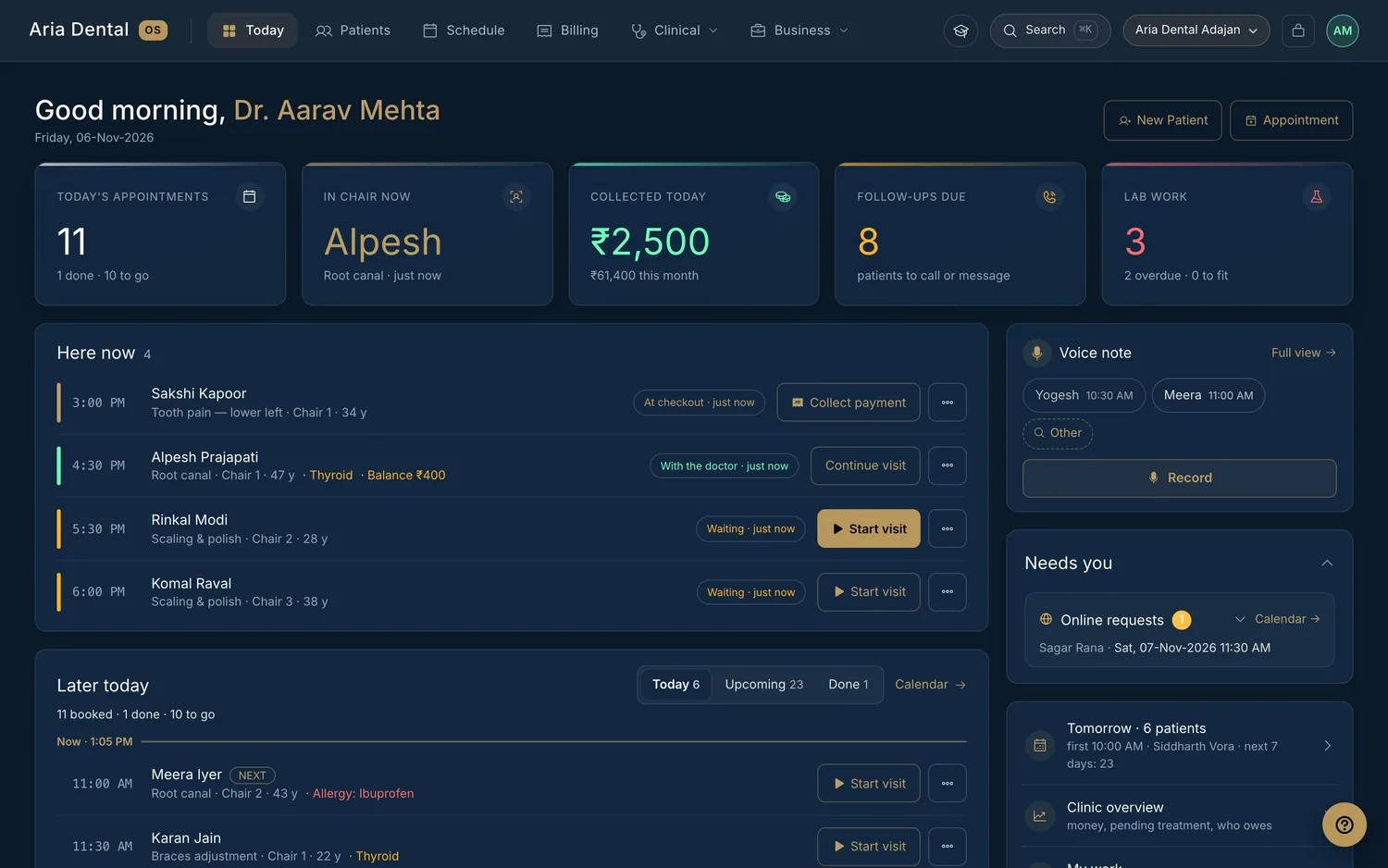
Today at a glance
Open Odontra and the day is already laid out — who is coming, who is next, what was collected and what still needs attention.
- —Today’s appointments, who is next and who has been seen
- —Collected today, the outstanding balance and profit this month
- —Pending treatment, follow-ups due and lab work waiting
- —WhatsApp and “data saved” status, always in view
Visit guide
One guided visit.
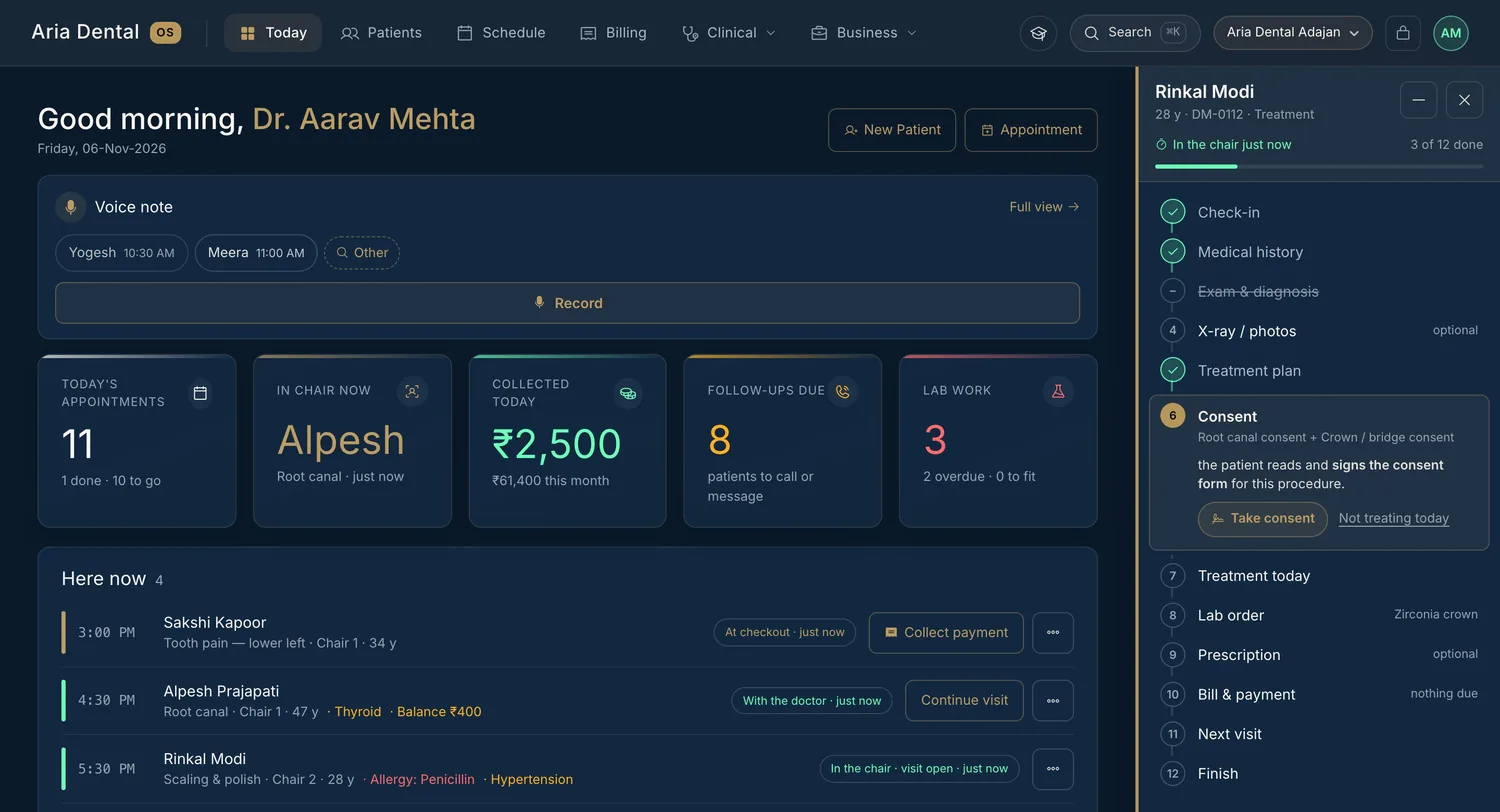
From the front desk to the next date: the steps of a real visit, with a button for each — without leaving the screen you are on.
- —The front desk marks a patient arrived; the doctor sees “Here now” with how long each has waited, and starts the visit
- —A bar follows the doctor across every screen: medical history, examination, X-ray, plan, consent, treatment, prescription, payment, next visit, finish
- —One big button for the next step; the small jobs open as pop-ups, so nobody goes hunting through menus
- —The medical history is read back before work starts, and consent is checked for the procedure being done — not just any form
- —The next visit is booked in one tap (a week, a month, six months), and the patient is told on WhatsApp if they agreed to messages
- —Finishing the visit can send the prescription, the receipt and the care sheet on WhatsApp
- —A walk-in is one tap; a doctor can keep two patients open at once
Patients
Everything about the patient. One screen.
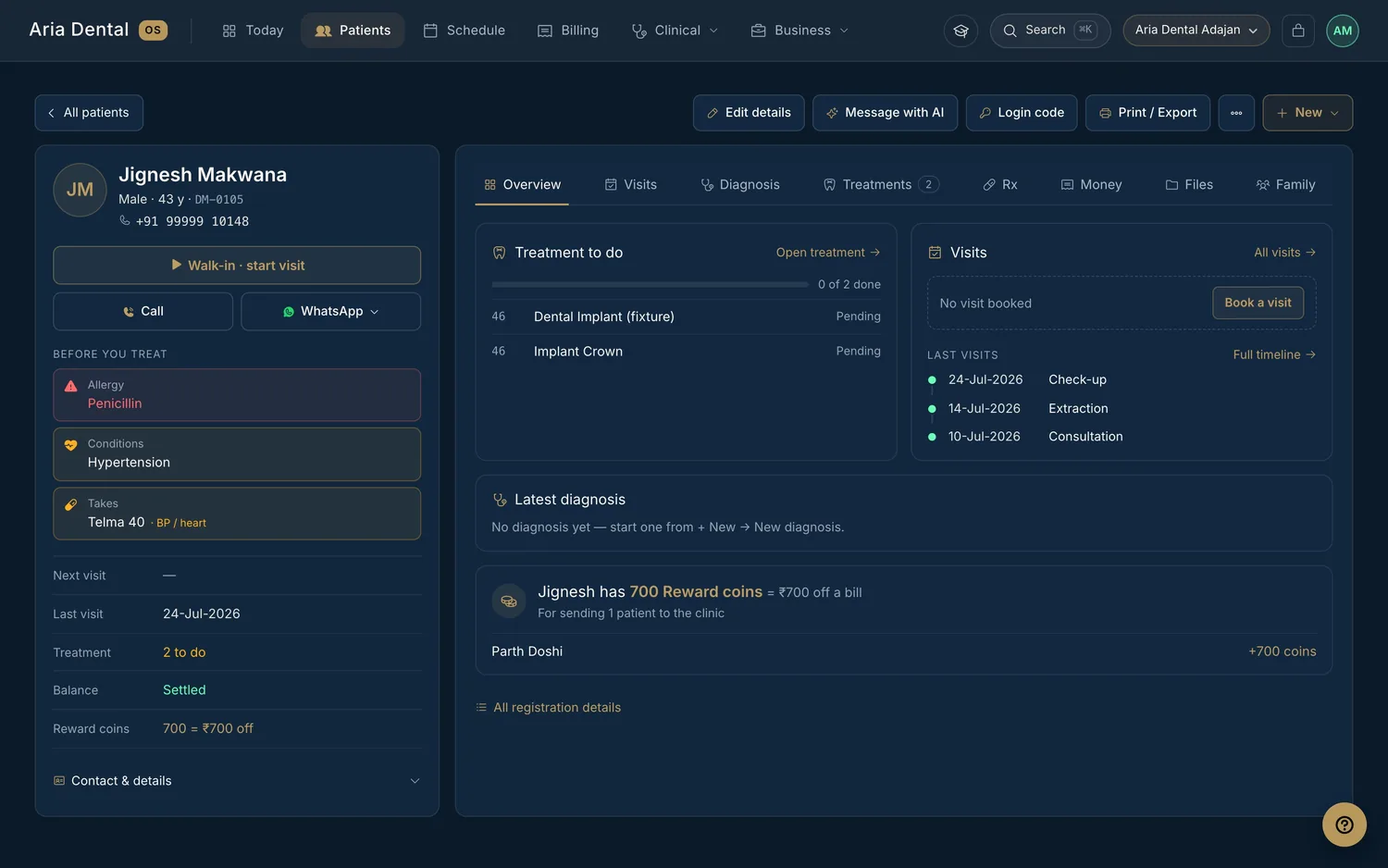
What matters medically comes first, then history, plan, imaging and money.
- —Allergy and medical alerts shown before you treat
- —Call, WhatsApp or print the full history in one tap
- —Treatment, records, imaging, documents, money and family in tabs
- —A long list stays easy: search, A–Z letters, “owes money” and area filters, 30 to a page
- —Bring your existing patient list in from a CSV or Excel file
3D tooth chart
Your findings, on real teeth.
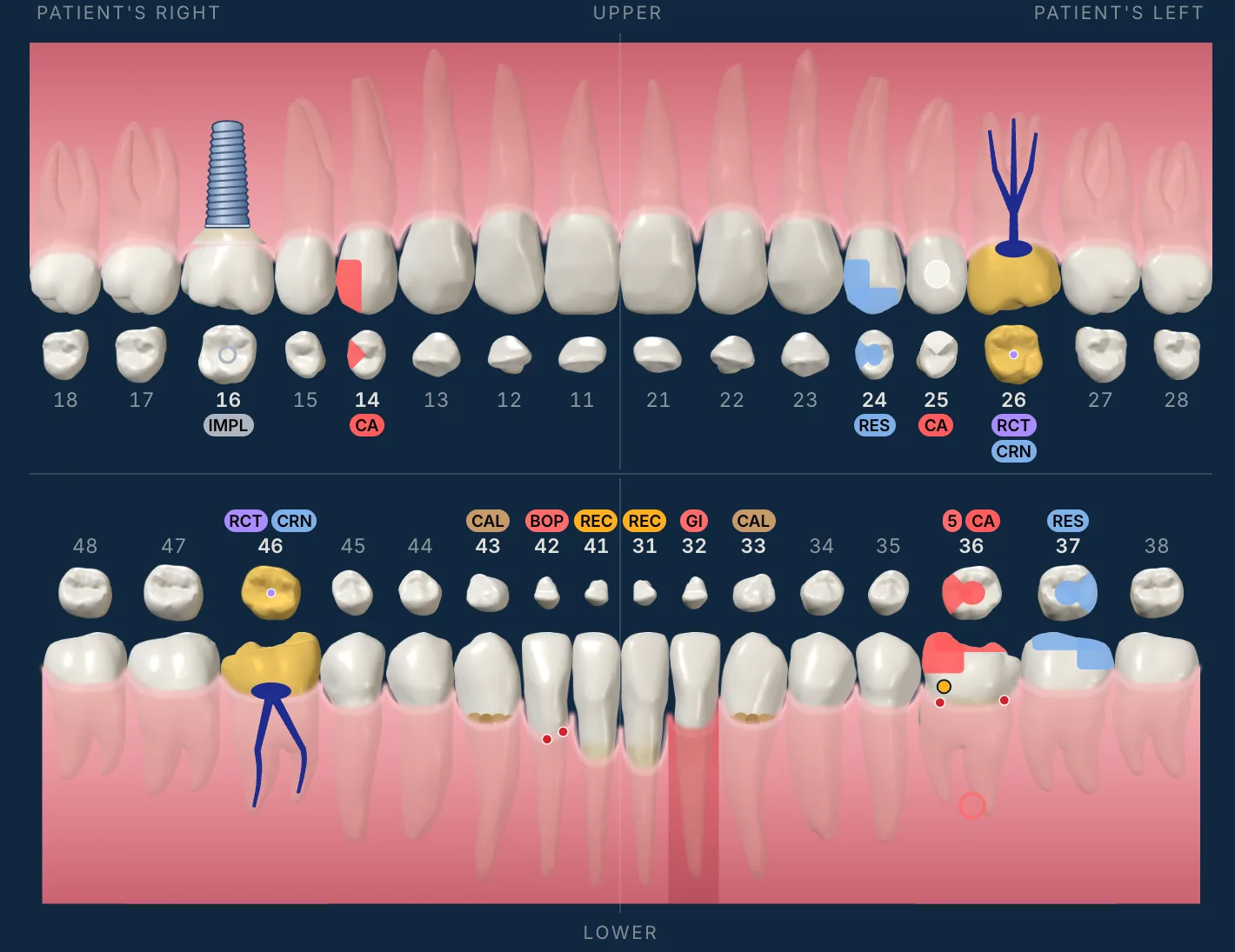
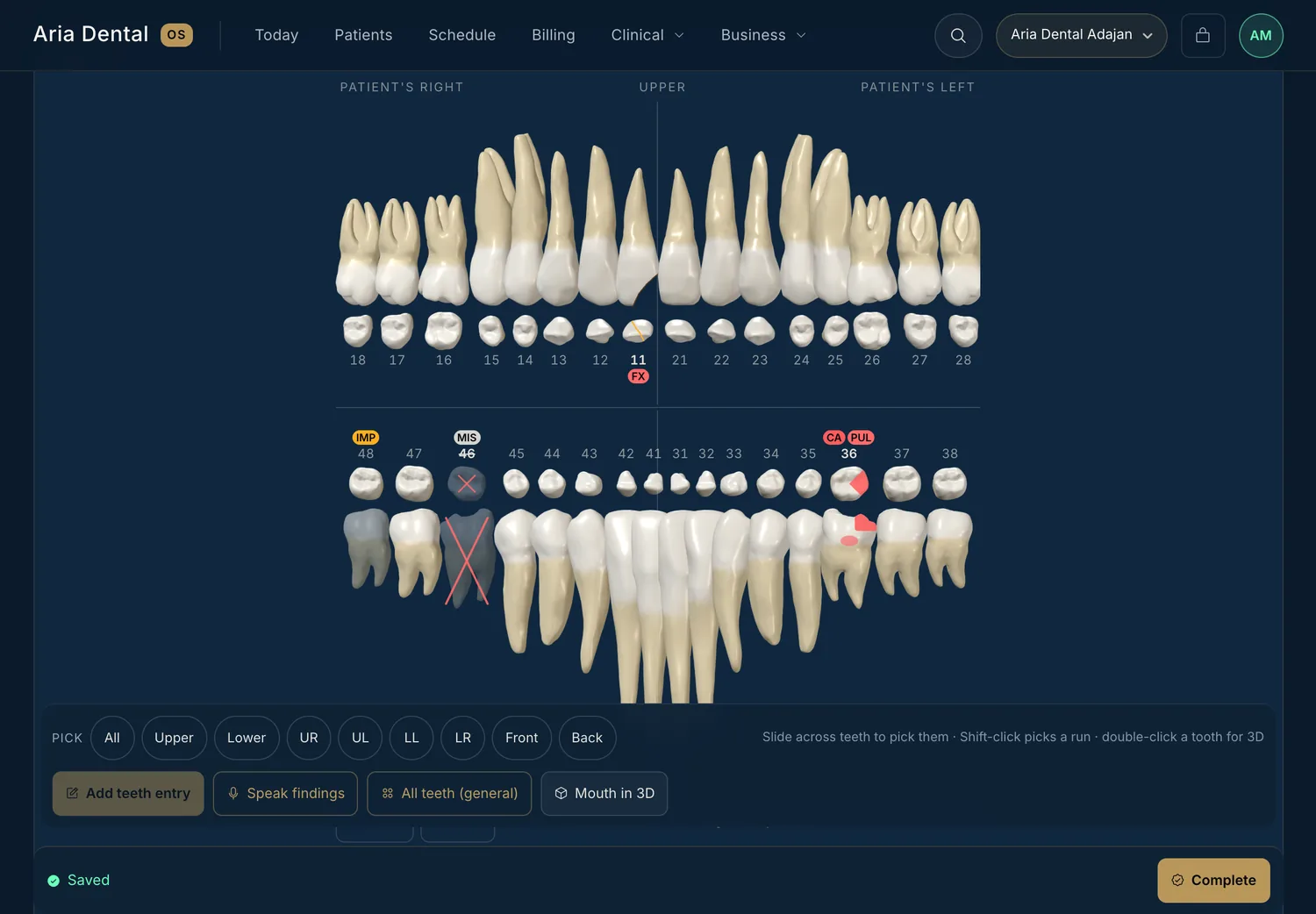
A chart drawn from real tooth anatomy — and one click to see the same findings in 3D, tooth by tooth or the whole mouth.
- —Caries, fillings, crowns, root canals, implants, bridges and gums drawn where they were recorded
- —Double-click a tooth (long-press on a phone) to turn it in 3D
- —“Mouth in 3D”: both arches with the gum and every finding, for showing the patient
- —Permanent, primary and mixed teeth; perio chart with six sites per tooth
- —Compare two examinations, and print the 3D mouth in the report
Speciality views
Each doctor sees their speciality first.
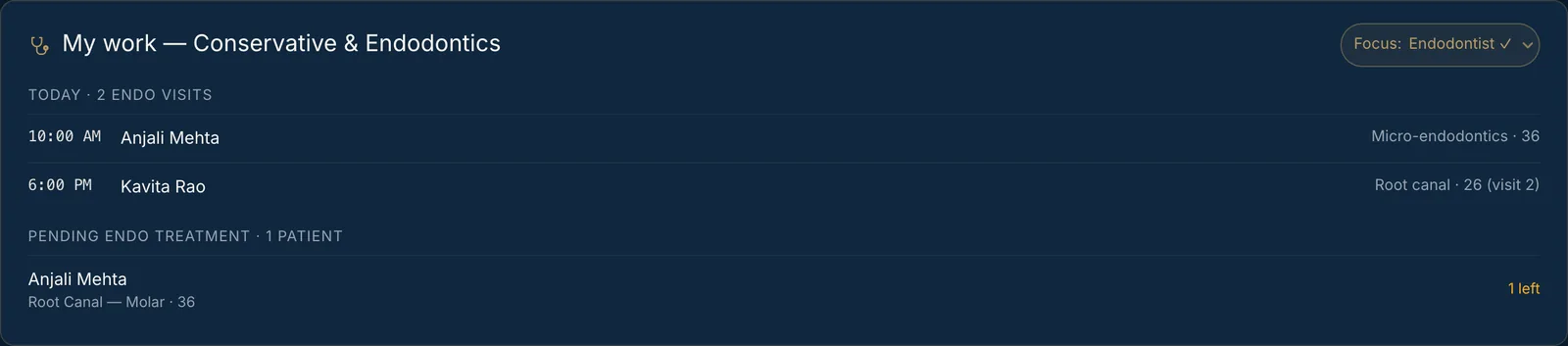
A surgeon, an endodontist and an orthodontist open the same record — each with their own work in front.
- —“My work” on the home screen: today’s visits and pending treatment of your speciality
- —“Check first” on the report: what your speciality checks before it starts
- —Speciality record cards: surgery, endo canals, implant site, pedo, prostho, oral medicine
- —Usual next visits for each speciality, offered — never booked by themselves
Schedule
One calendar for every chair.
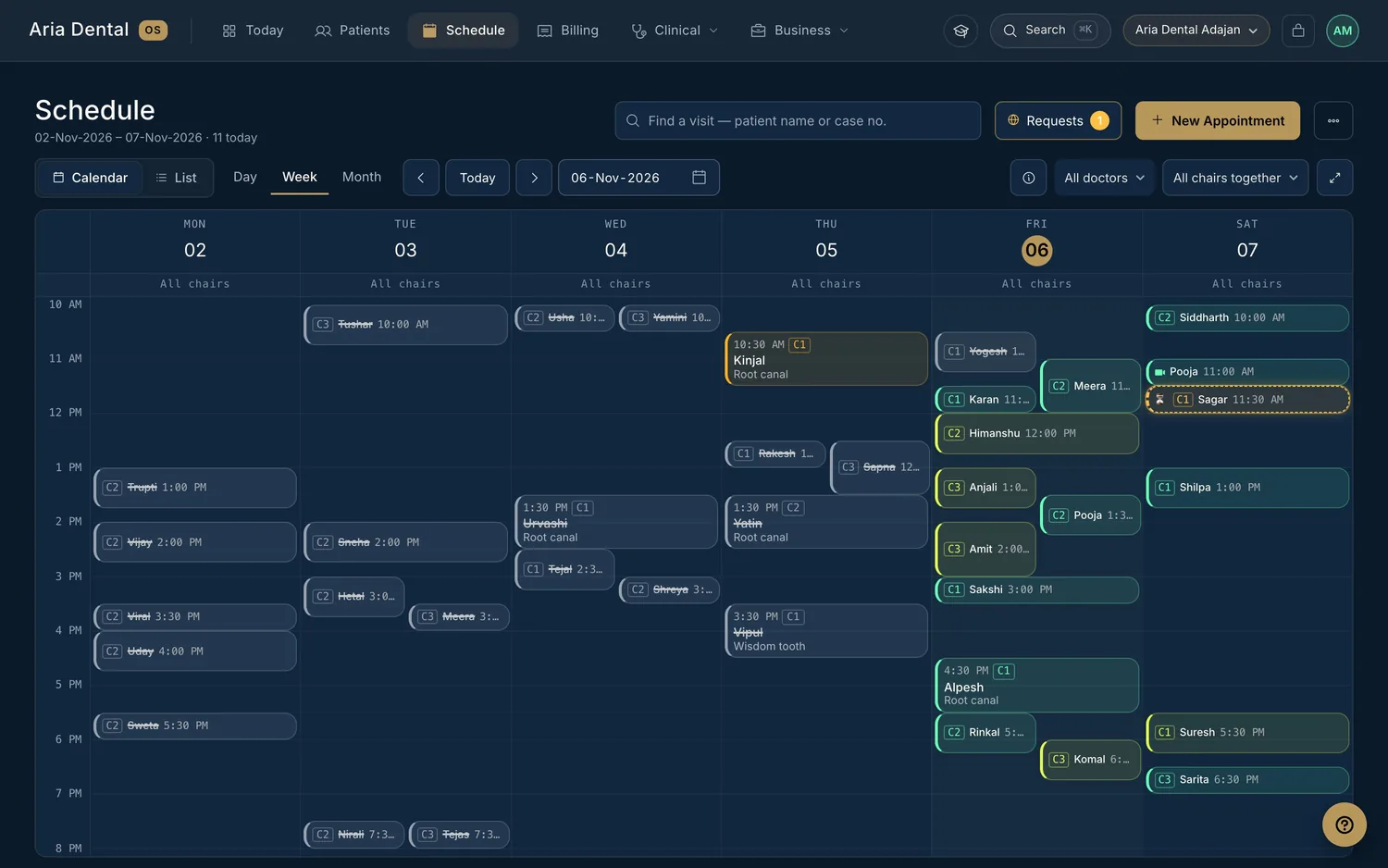
The whole week by chair, with colours for what each visit is. Online requests wait for one tap.
- —Day, week and month views, chair by chair
- —Online booking requests approved or declined in one tap
- —Holidays and closures block the calendar
- —Clash warnings if two visits share a chair
Treatment planner
Plan tooth by tooth.
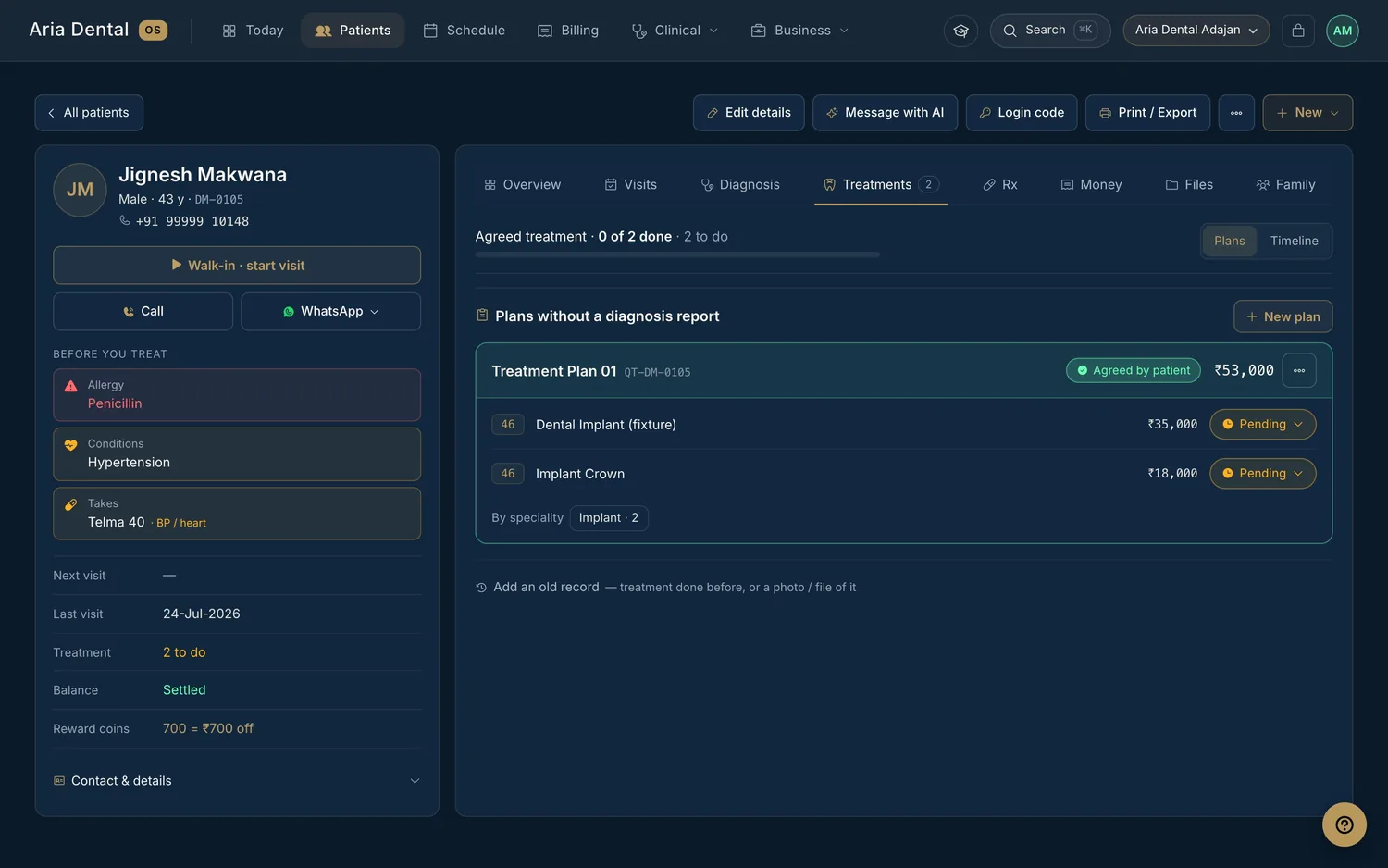
One box per tooth, titled with that tooth’s findings from the diagnosis — and every treatment for the tooth inside it, in its speciality’s colour.
- —One box per tooth with its diagnosis findings; a bridge joins its teeth, whole-mouth work has a box of its own
- —Each speciality has its own colour — endo, prostho, perio, surgery, implant, ortho, pedo, cosmetic — so a long plan reads at a glance
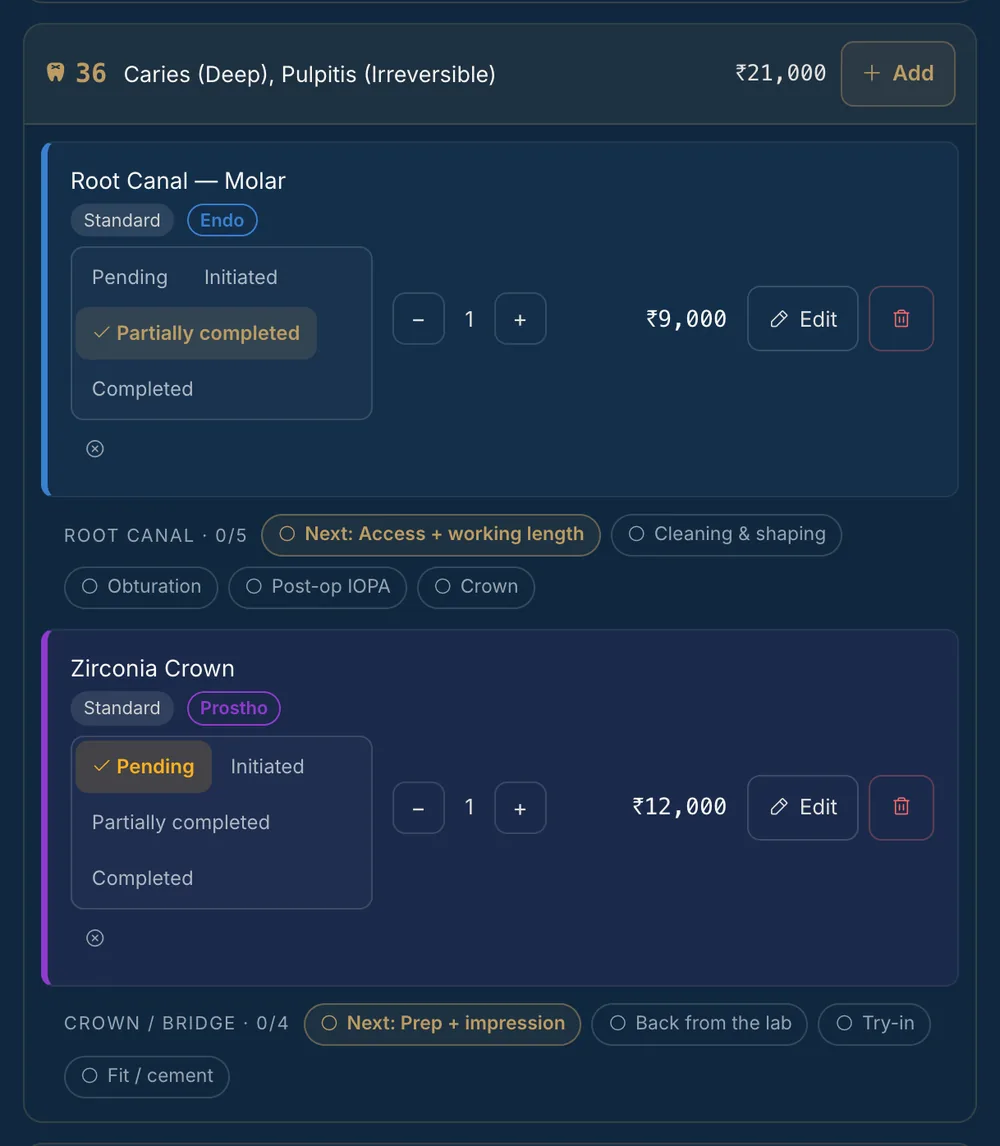
- —Four statuses on every treatment: Pending, Initiated, Partially completed and Completed — a treatment is owed only once it is initiated
- —Standard, Premium and Luxury tiers with a live total; a price you type once is remembered
- —Step trackers for root canals, implants, dentures, crowns and braces: tick a step, and the next visit names the next one
- —A visiting doctor can be put on any treatment, with their share
- —Send on WhatsApp or print as PDF on your letterhead
Prescriptions
Write for the treatment, in one tap.
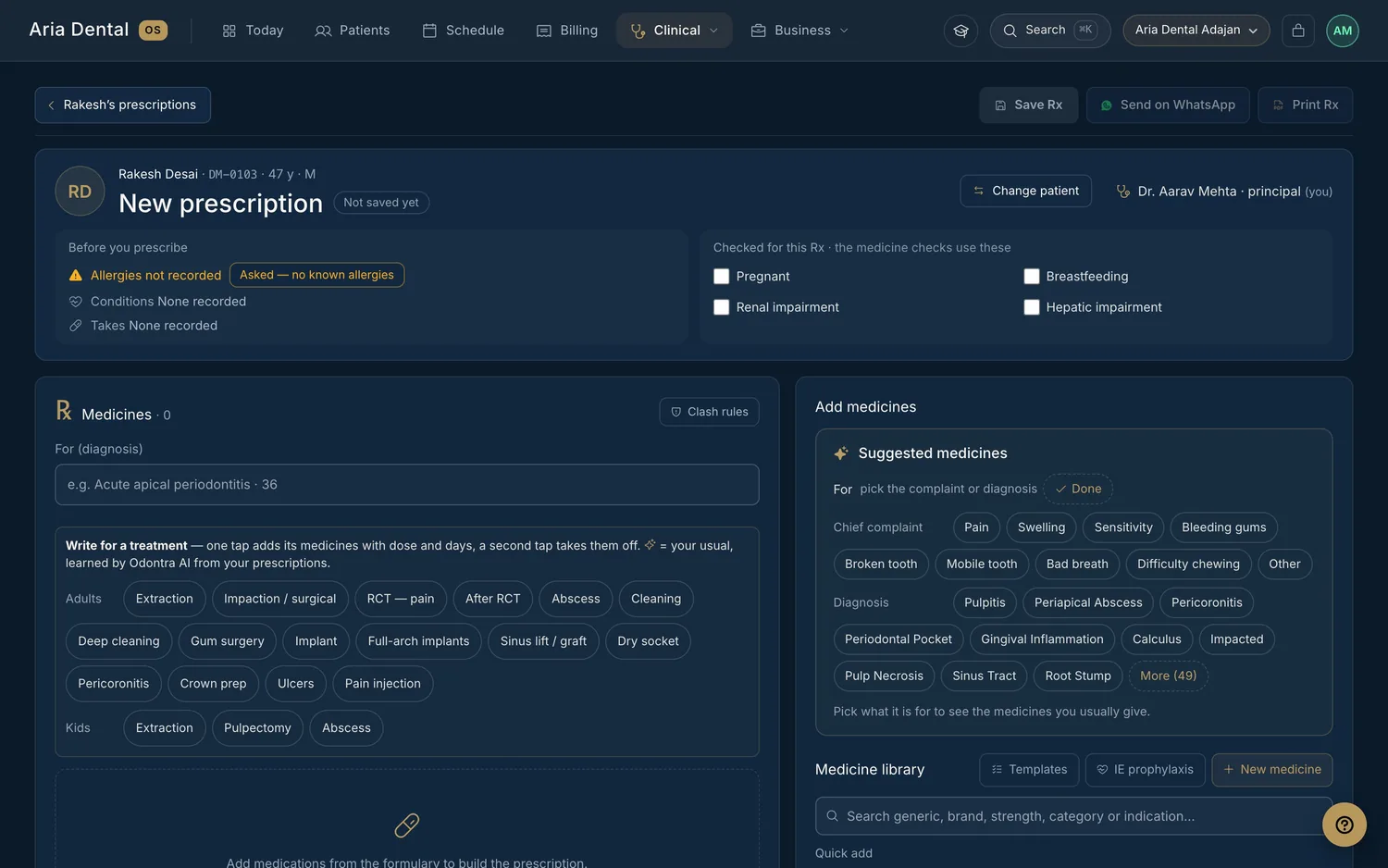
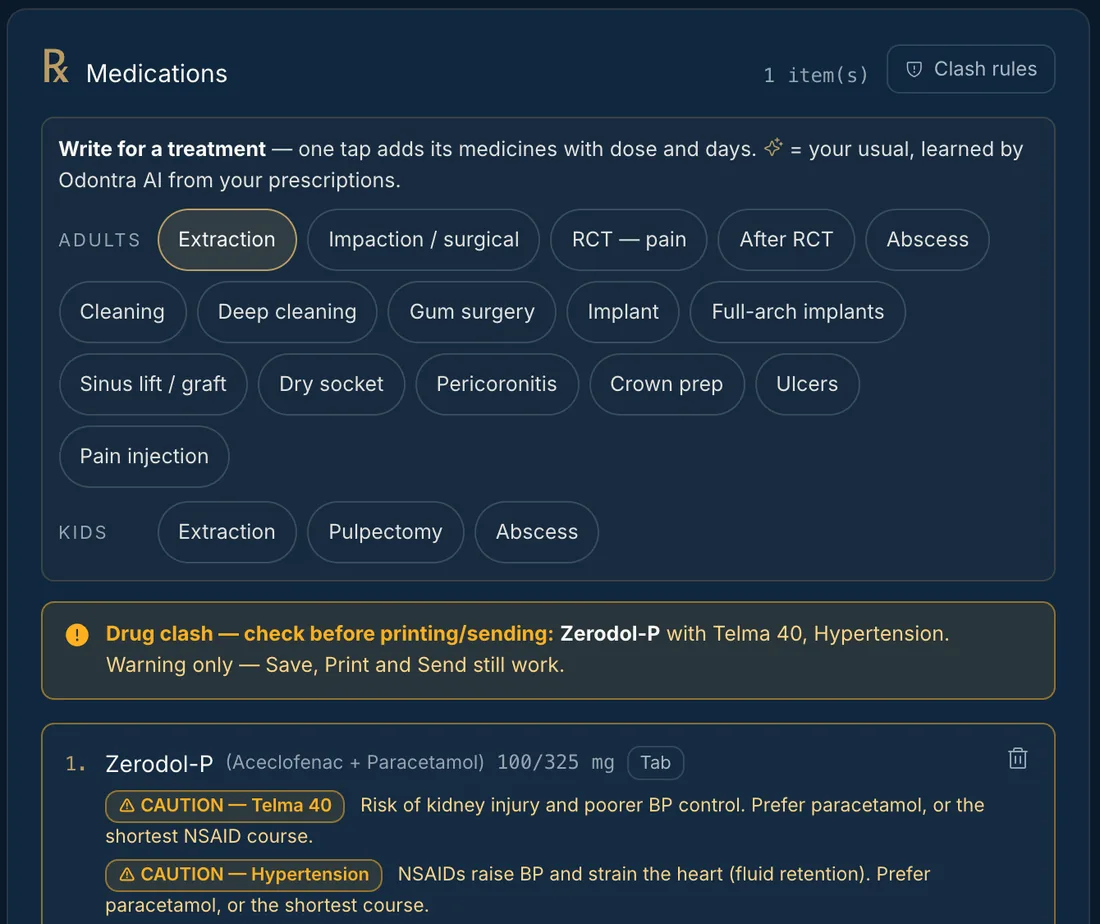
Tap the treatment — the medicines come with dose, days and food filled in, and anything this patient must not have is left out.
- —One-tap templates for 16 adult treatments and 3 for children — extraction, RCT, implant, gum surgery, abscess and more
- —Popular Indian brands in the suggestions, and a separate children’s list
- —Checks before you save: allergies, the child’s age, kidney and liver, clashes with the patient’s conditions and current medicines, and a second painkiller of the same kind
- —Your usual medicines for each treatment, learned from your own prescriptions
- —Antibiotic-stewardship reminders; warnings never stop you saving, printing or sending
Billing
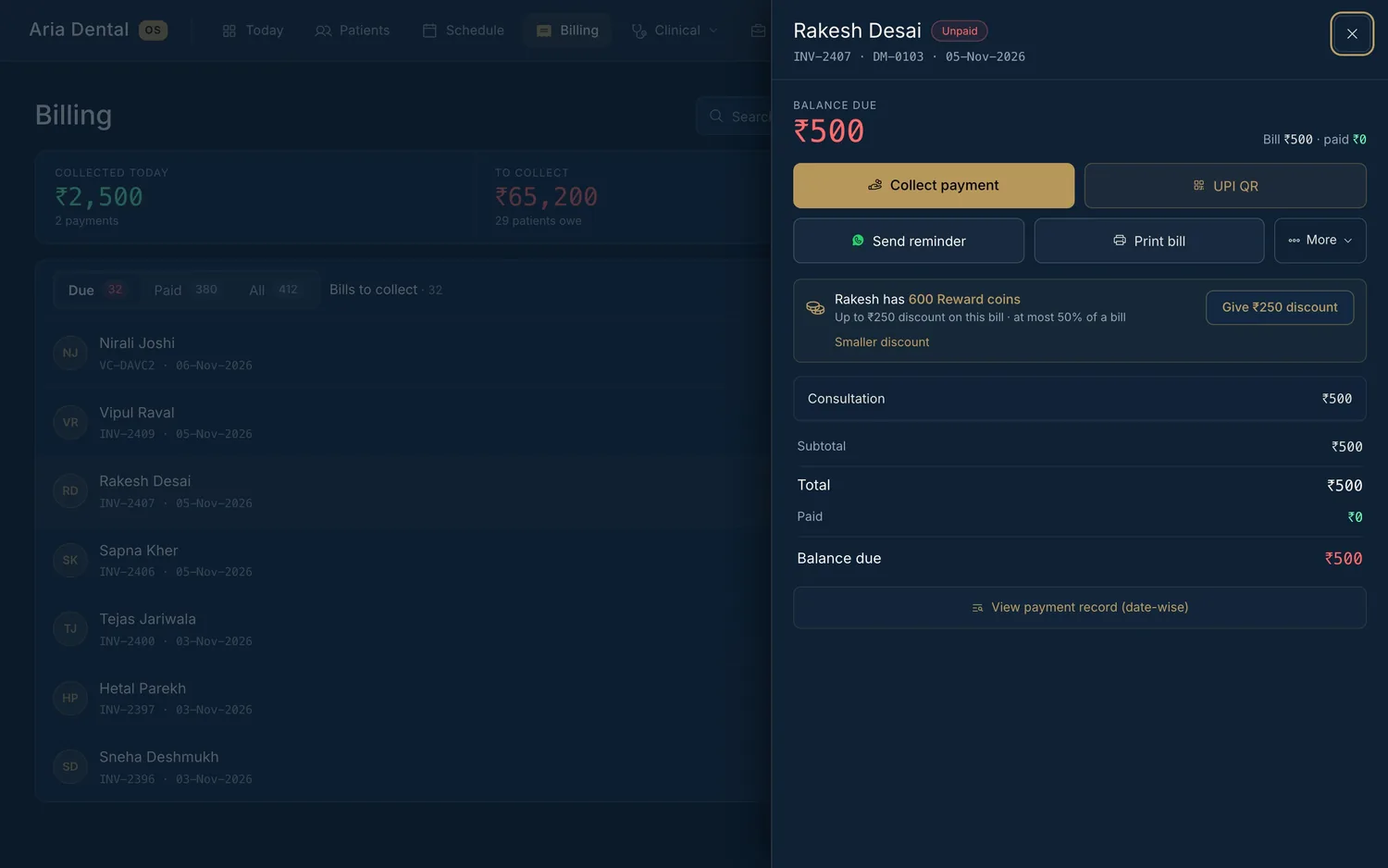
Billing, without the guesswork.
Invoices that follow the treatment plan, with every rupee accounted for.
- —Part-payments and a clear balance for every patient
- —UPI link and QR, on screen or on WhatsApp
- —Patients can report a UPI payment from their phone, for you to confirm
- —Invoices on your own letterhead
Visiting doctors
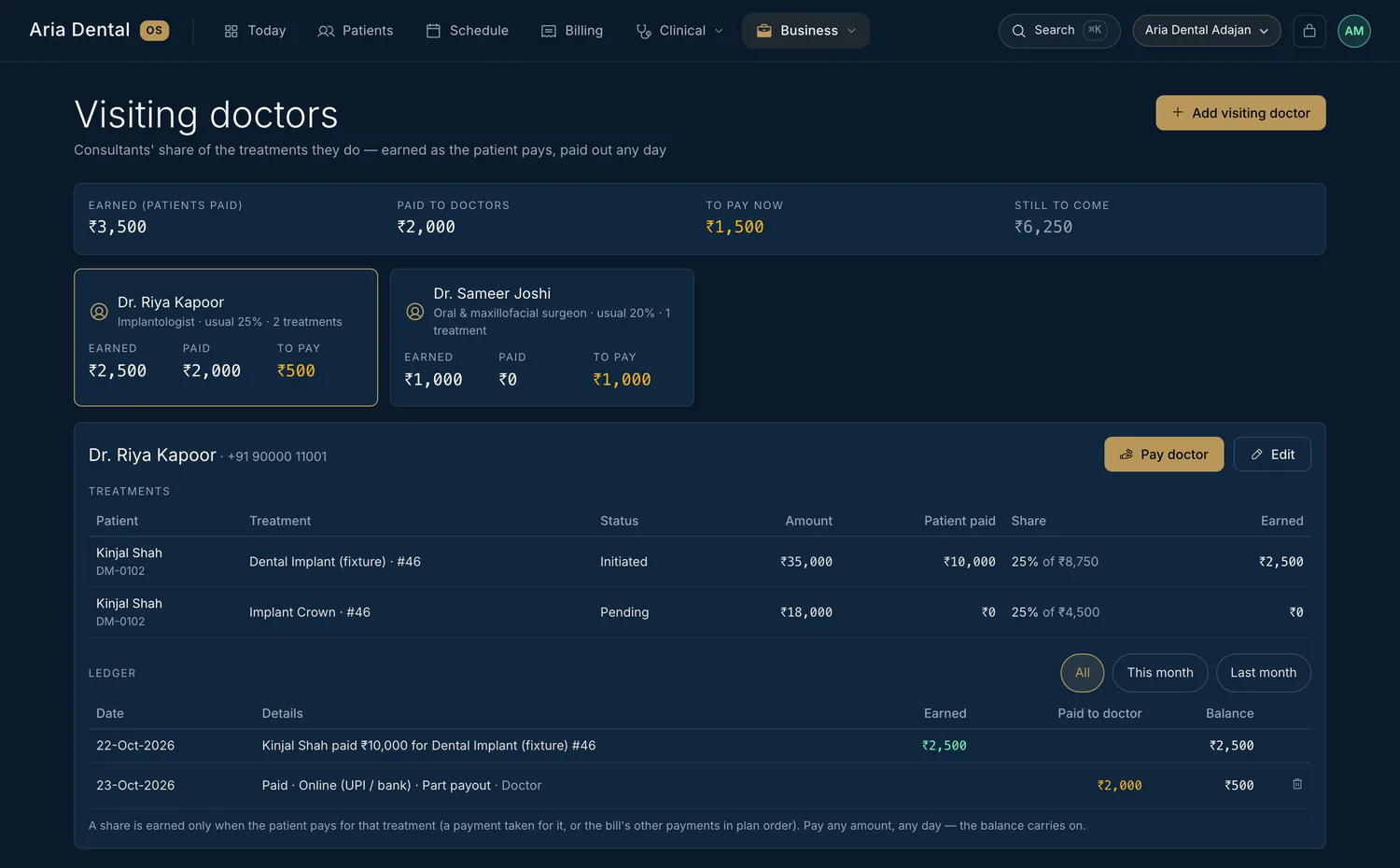
Visiting doctors, settled fairly.
For the implantologist or surgeon who comes in: their share of each treatment, earned only as the patient pays, and paid out whenever you choose.
- —Put a visiting doctor on any treatment with a % share or a fixed amount — the planner suggests the doctor of that speciality
- —The share is earned only as the patient pays: half the treatment paid, half the share earned
- —A dated ledger per doctor: each treatment, what the patient paid, what the doctor earned, what you paid out and the balance
- —Pay any amount, any day — cash, online or cheque
- —An optional WhatsApp to the doctor when a patient pays for their treatment and when you pay them
Lab work
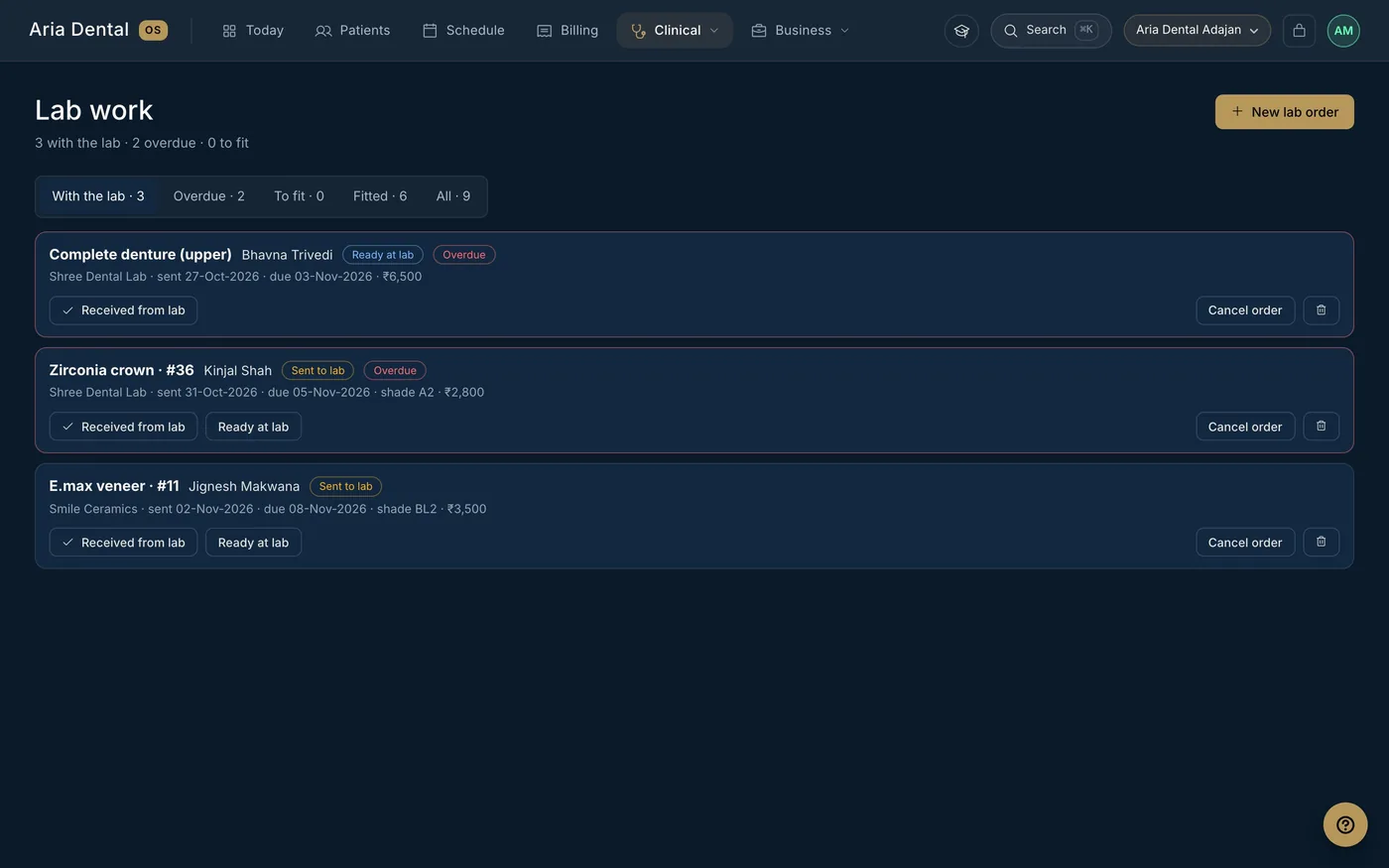
Lab work, tracked.
Know where every crown, denture and bridge is — and which ones are late.
- —Sent, ready and fitted, with due dates
- —Overdue cases are flagged for you
- —Linked to the patient and the tooth
X-ray inbox
X-rays find their patient.
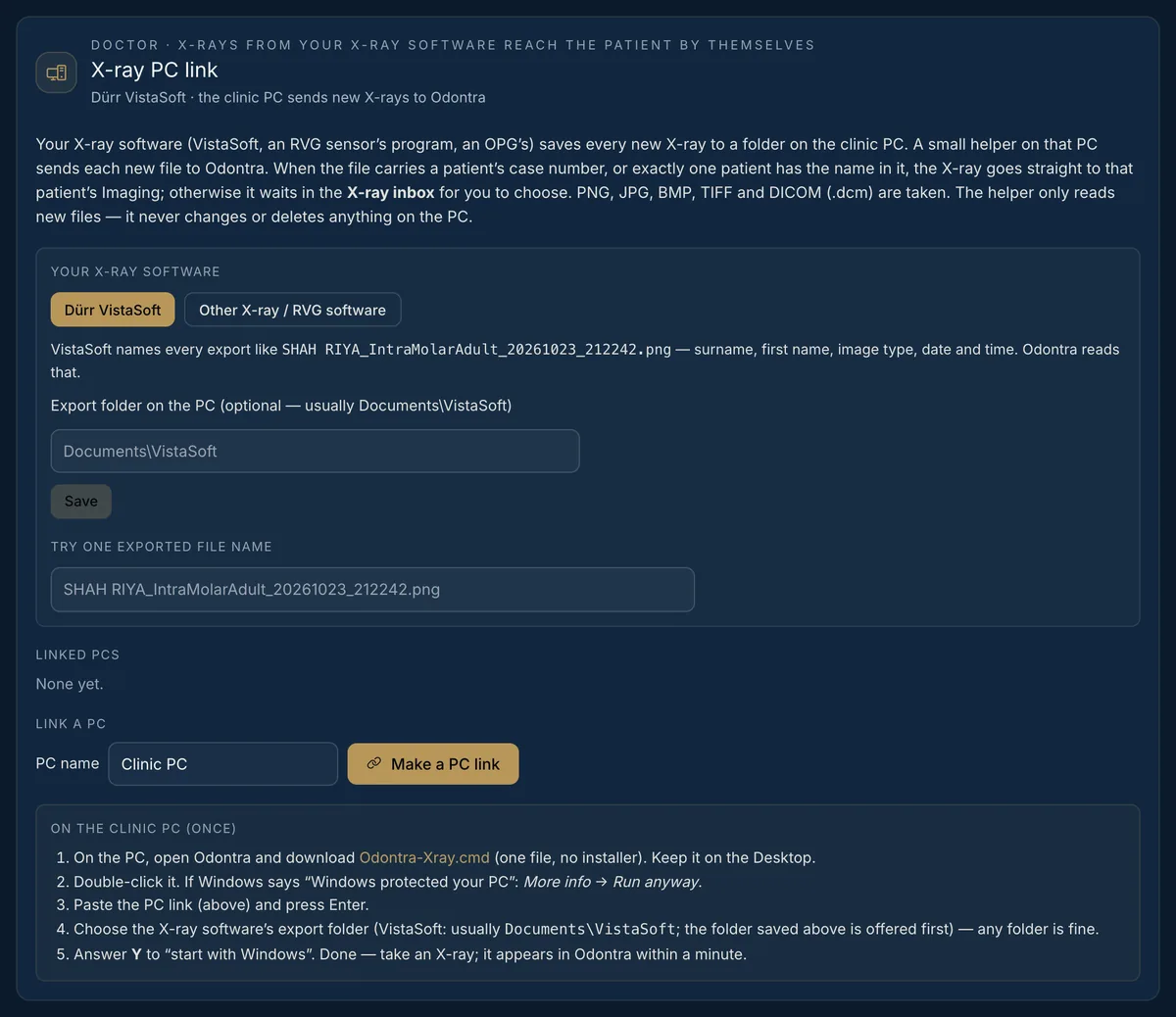
In pilot at our first clinic: each new X-ray from the clinic’s X-ray software reaches the right patient’s file by itself.
- —A small helper on the X-ray PC sends every new X-ray, OPG or RVG image to Odontra — it only reads new files
- —The patient’s case number in the file name, or exactly one patient with that name, files it on that patient; anything unsure waits in the inbox for you to choose
- —Dürr VistaSoft ready; other X-ray and RVG software with a file-name pattern; PNG, JPG, TIFF and DICOM
- —Odontra AI X-ray review, being taught at the same clinic: its marks are only suggestions — the dentist accepts, redraws or rejects each one
Aligners
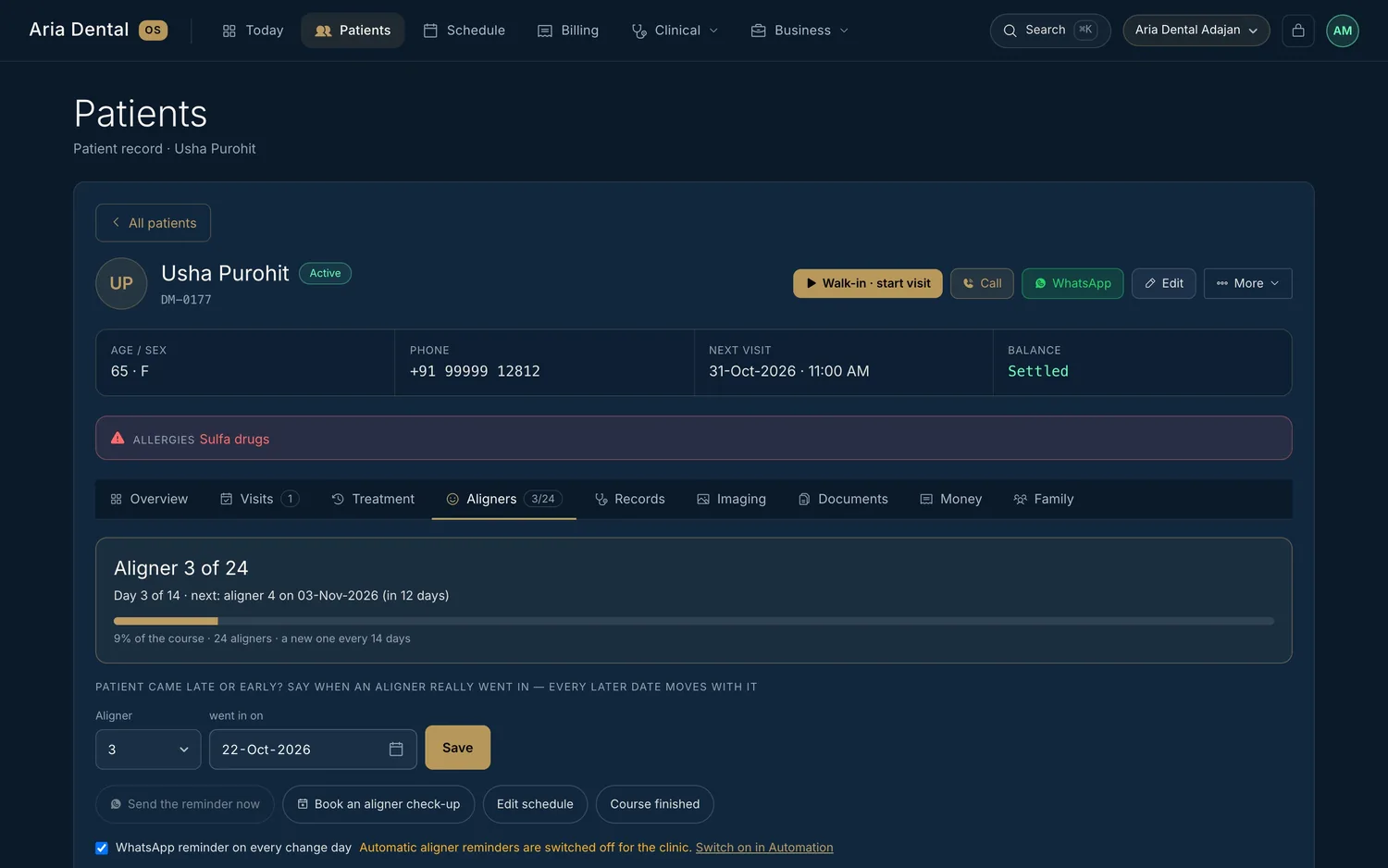
Every aligner change, on time.
Set the course once. Odontra works out every change day and reminds the patient on WhatsApp.
- —How many aligners, the day the first went in and how many days each is worn
- —The next aligner and its date, always on the patient’s record
- —A patient late or early? Say when an aligner really went in — every later date moves with it
- —An automatic WhatsApp reminder on each change day, in the patient’s language (it stays off until you switch it on)
- —A list on the home screen of who changes aligner this week
Ortho batches
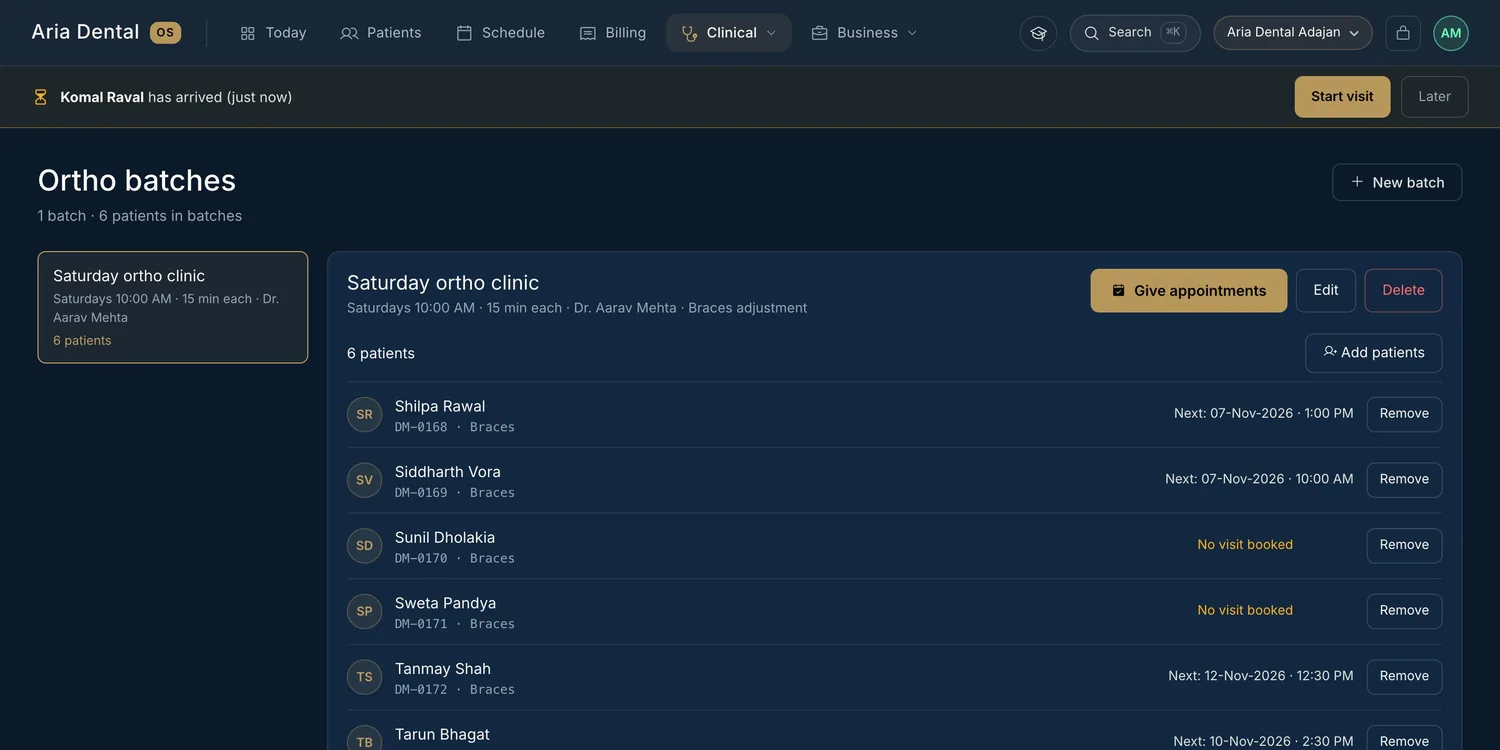
A whole batch booked in one go.
Group braces and aligner patients, then give all of them their appointments in a single step.
- —Make a batch — “Saturday ortho clinic”, its day, its first time and the minutes for each patient
- —Add patients: braces and aligner patients are listed first
- —One tap books the whole batch one after another on free chairs, skipping closed times and anyone already booked that day
- —Each patient is sent the confirmation on WhatsApp, if they agreed to messages
- —See every member’s next visit at a glance
Follow-ups
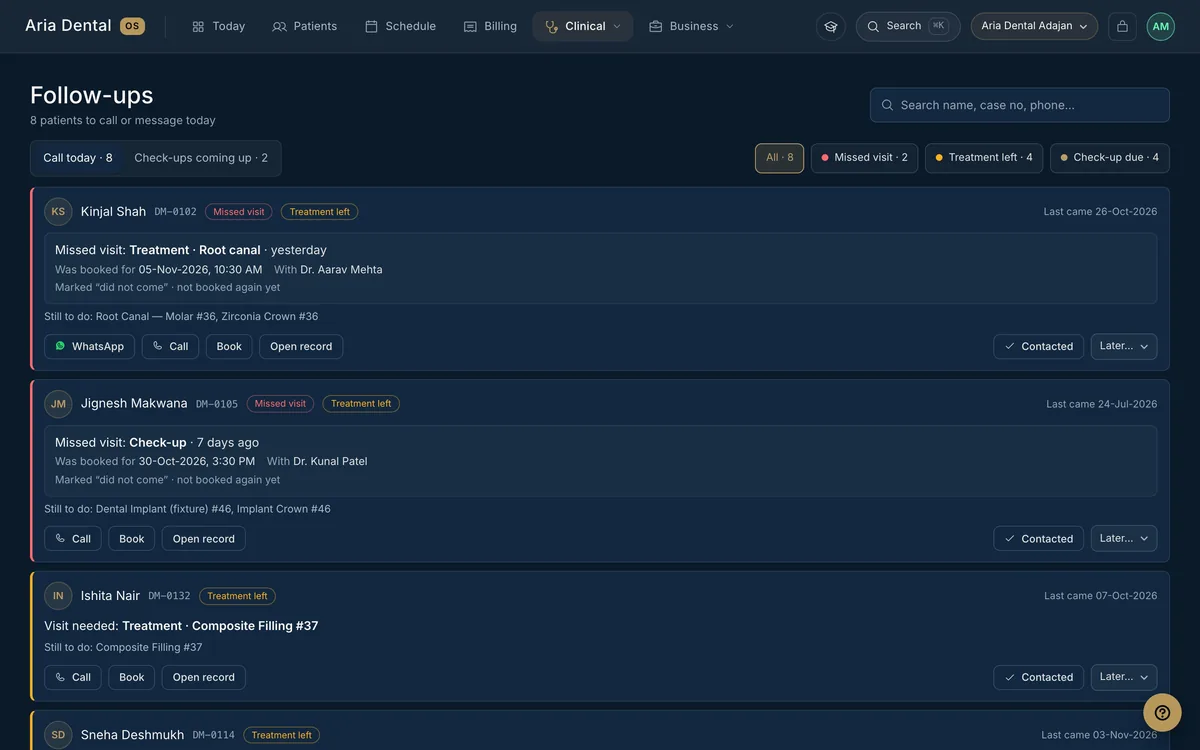
Nobody falls through the cracks.
Check-ups that are due, treatment left unfinished and missed visits — in one list.
- —Contact in one tap, by call or WhatsApp
- —Recalls that run themselves when you switch them on
- —Missed visits surfaced automatically
- —After-care due: suture removal, gum re-evaluation, implant stage 2 and review X-rays — shown to the desk, nothing sent by itself
Pending treatment
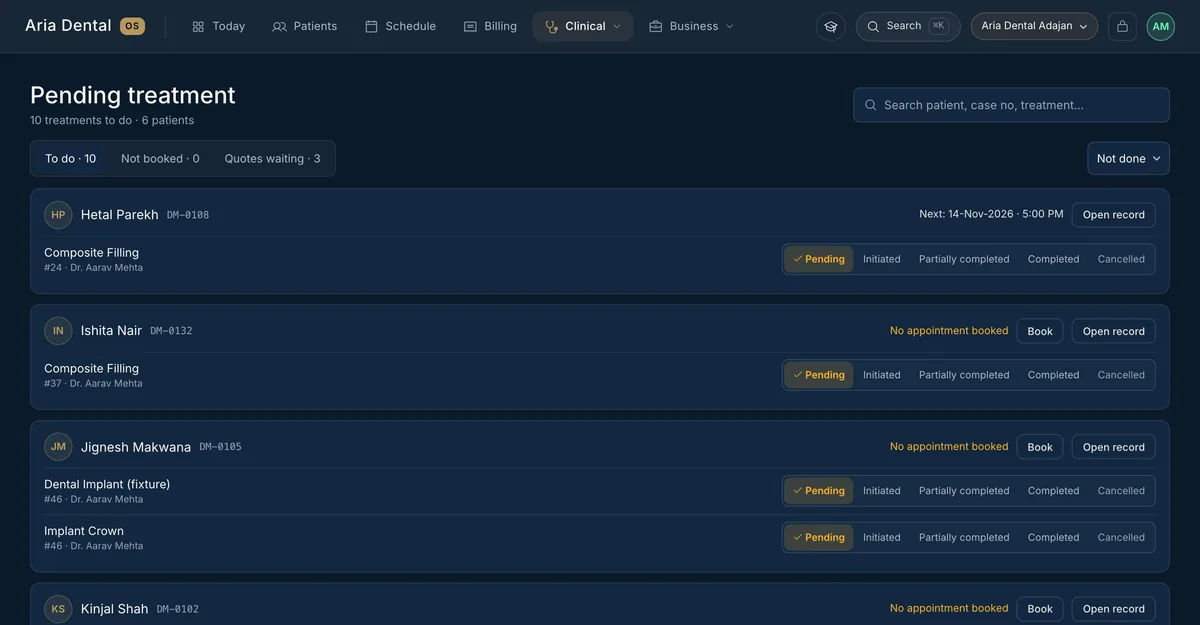
See the work still waiting.
Every planned procedure that has not been done yet, with the patient and the next visit.
- —Every treatment step that is not done yet, in one list
- —Not booked: accepted plans with no next appointment
- —Quotes waiting: quotations not yet accepted, biggest first, with a WhatsApp follow-up in one tap
- —A status and a note on each step
Reports
Every number explained.
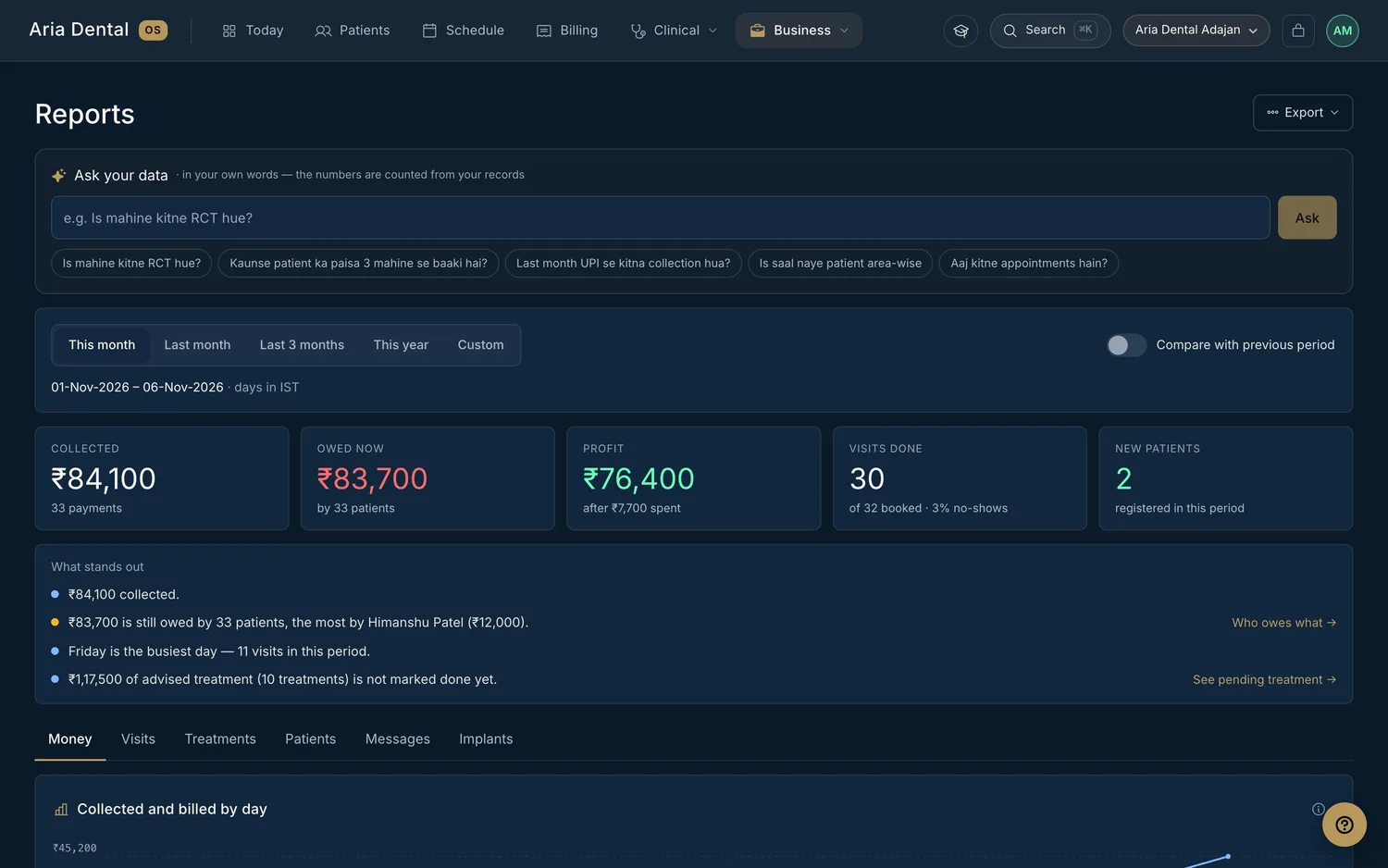
Five numbers on top, a few plain sentences on what stands out, and tabs for money, visits, treatments, patients and messages. Each figure says how it was counted.
- —This month, last month, last 3 months, this year or a custom range — compared with the period before
- —Who owes you the most, and how old the dues are
- —Busiest days and hours, no-shows, chairs and doctors
- —Where new patients come from, and which patients sent others
- —Implants register: every implant by brand and size, who has it, and stock with expiry dates
- —Payments and appointments download as CSV for your accountant
Automation
Quiet by default.
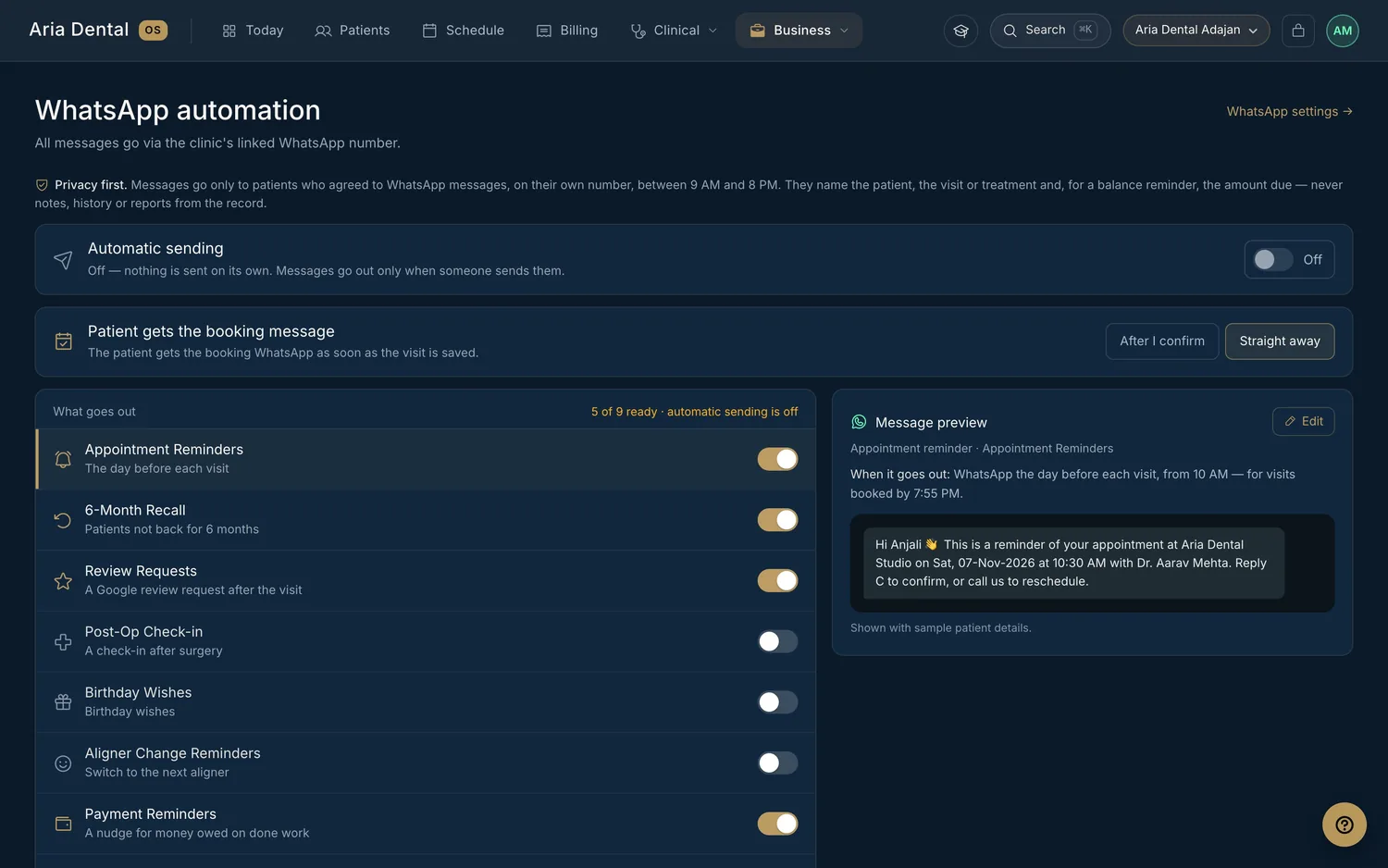
Eight automatic WhatsApp messages, each with its own switch — and nothing goes out until you turn automatic sending on.
- —Reminders, 6-month recall, review requests, post-op check-ins, birthday wishes, payment reminders, aligner change reminders and a monthly referral note
- —A live preview of the message, before it ever reaches a patient
- —See what would go today, and to whom
- —Messages show the clinic name and treatment only — never a patient’s identity
- —Clear prompts for what is left to finish, such as your Google review link
Referrals
Patients who send patients earn coins.
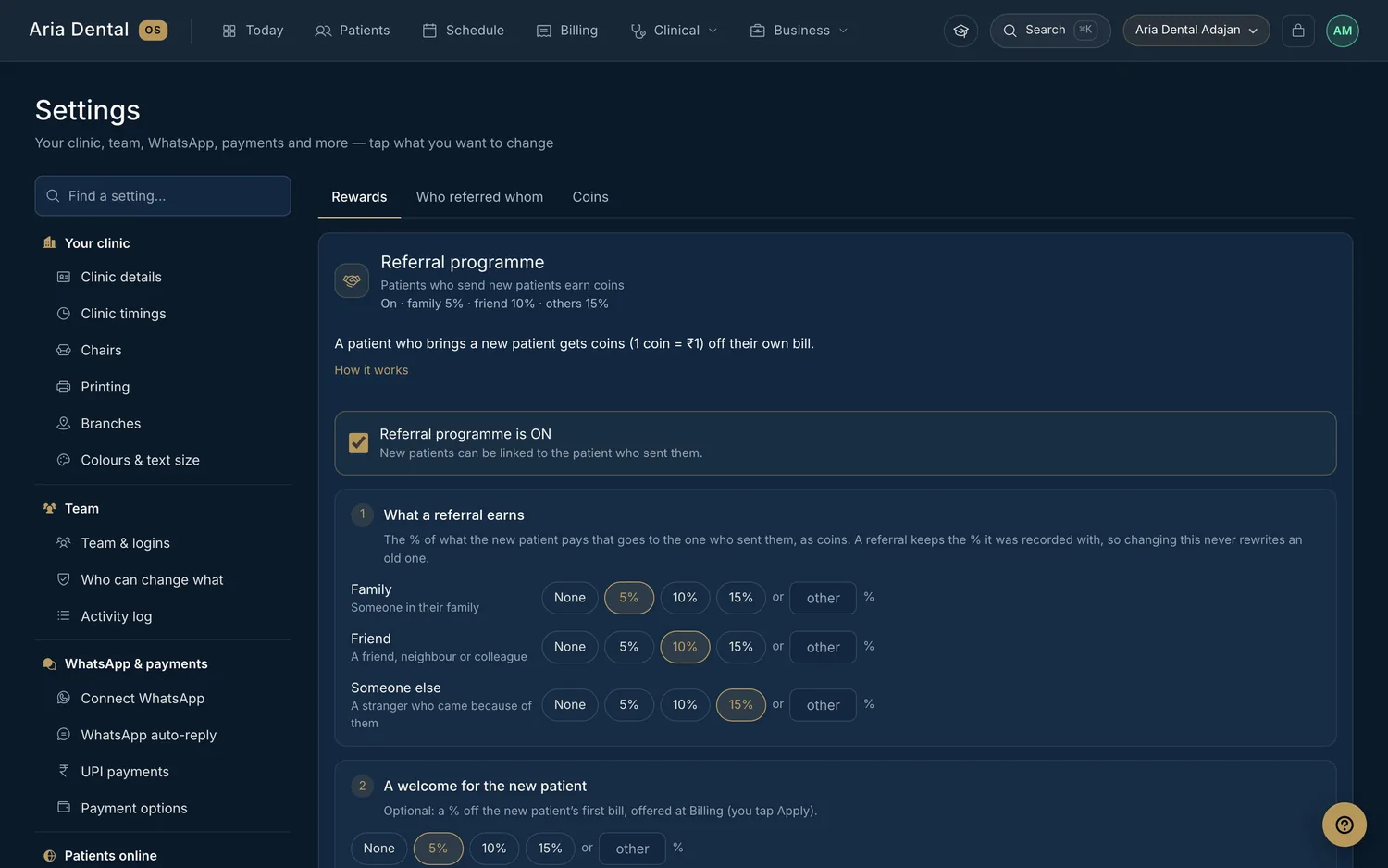
Switch on a referral programme in Settings. When a patient you referred pays, the one who sent them earns coins to use on their own bills.
- —Set the % for family, friend or someone else — 5, 10, 15 or your own number
- —An optional welcome discount on the new patient’s first bill
- —Coins come from what the new patient actually pays; an unpaid bill earns nothing, a refund takes the coins back
- —You set the limits: a cap per referral, and how much of a bill coins can cover
- —Coins show on the patient’s record and at Billing, where your team applies them
New in Odontra
Shaped by a working clinic.
The latest changes, from the treatment plan to the prescription pad. Every screen here is the real app with a sample clinic and made-up patients.
Treatment status
Pending until you start. Owed only from Initiated.
Every treatment has four steps — Pending, Initiated, Partially completed and Completed. A planned treatment does not touch the patient’s balance until you initiate it. Partially completed asks how much to take now; Completed opens the payment with what is left of that treatment.
Prescription
One tap for the treatment. Checked for this patient.
Tap Extraction, RCT, Implant or any of 19 templates and the medicines arrive with dose, days and food — popular Indian brands, a separate children’s list. Anything this patient must not have is left out and named, and a clash with their conditions or current medicines is flagged before you print or send.
iPad
The whole chart on an iPad, no scrolling.
On a tablet the tooth chart is sized to the screen and the pick row stays pinned below it — pick teeth, add findings, open the mouth in 3D. In landscape the 3D sits beside its controls and findings.
Updates
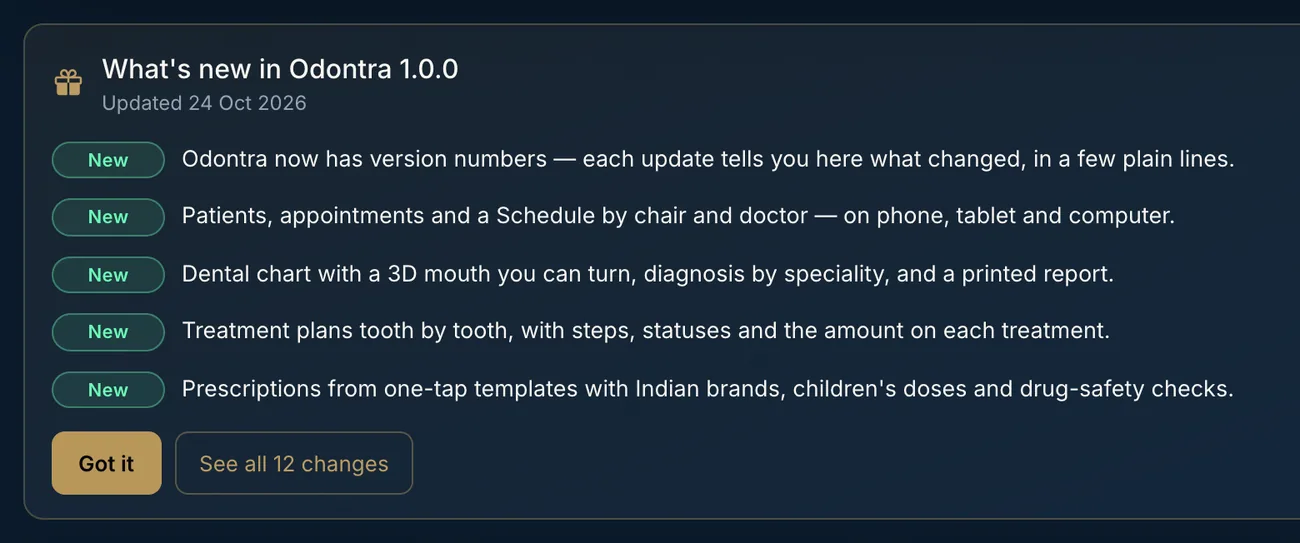
See what changed, in plain words.
Odontra has version numbers. After an update, the home screen shows a short “What’s new” note with only the lines for your role — and Settings keeps every version’s notes.
Chairside
Everything about the patient. One screen.
Open a patient and the whole story is there — what matters medically first, then history, plan, imaging and money.
1234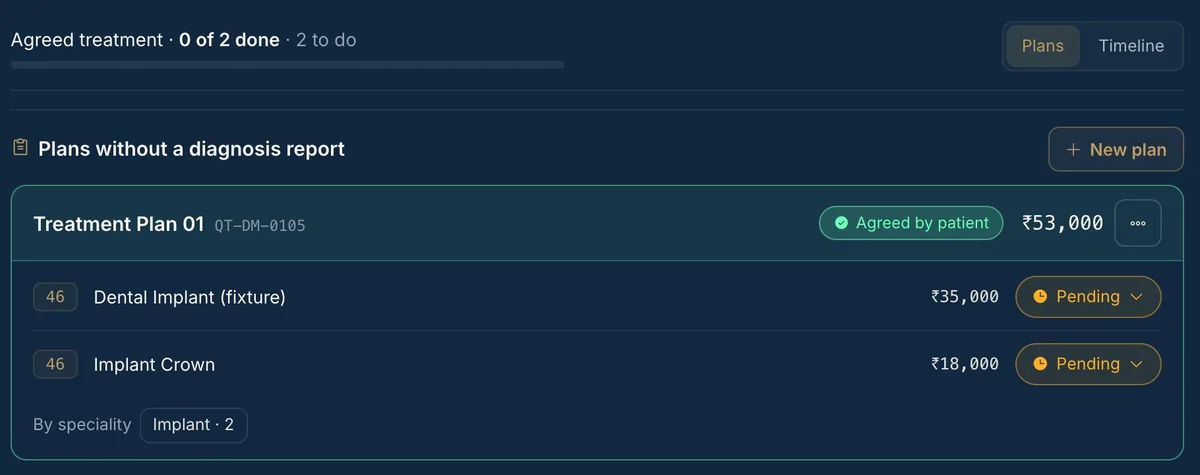
Treatment history
Done, pending and planned — at a glance.
Every procedure is tied to a tooth and a status, so you always know what is complete, what is waiting and what the patient still owes.
Big clinics
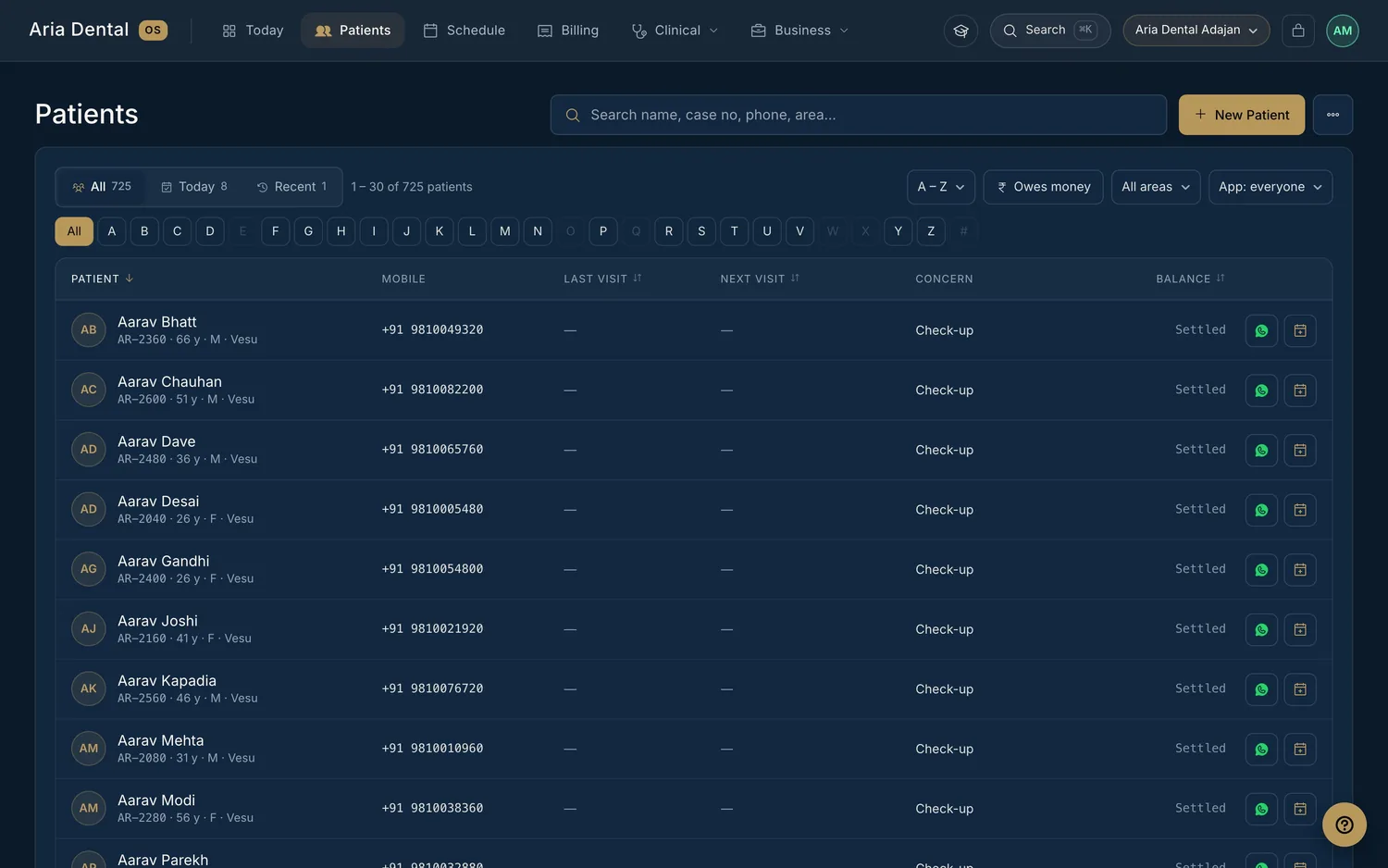
Thousands of patients, still one tap away.
Search by name, case number, phone or area. Or jump by letter, sort the list, show only the patients who owe money, or pick an area. The list opens 30 at a time, so it never turns into one endless scroll.
Imaging & CBCT
OPG, X-rays and photos in the patient file. DICOM (.dcm) series open with slice scroll and window/level.
Consent forms
Procedure-wise consent forms, printed or sent on WhatsApp, filed in the patient’s record.
Letterhead printouts
Plans, prescriptions and bills on your own letterhead — print, or send as PDF on WhatsApp.
Built for speed
Keyboard-first, the way power users like it.
A clinic software your front desk can fly through — without reaching for the mouse.
Command search
Press ⌘K (or Ctrl+K) anywhere in the app to jump to a patient, a screen or an action.
Keyboard shortcuts
Go to any module with two keys, and press ? to see every shortcut. Every control is reachable from the keyboard.
Your clinic’s look
Dark or light, ten colour themes, text size and corner style — set once for the whole clinic.
Phone, iPad, computer
The staff app fits phones and tablets — on an iPad the tooth chart and the 3D fit one screen at the chair.
Bring your patients
Import an existing list from CSV or Excel, with a preview and duplicate check before anything is created.
Families on one number
A mobile number can hold the whole family, with a household view for the front desk.
Your data, any time
One download with every patient, bill and appointment, in open formats.
Referral programme
Patients who send patients earn coins.
Reward the people who bring you new patients. Set the rules once in Settings; the coins are applied at Billing.
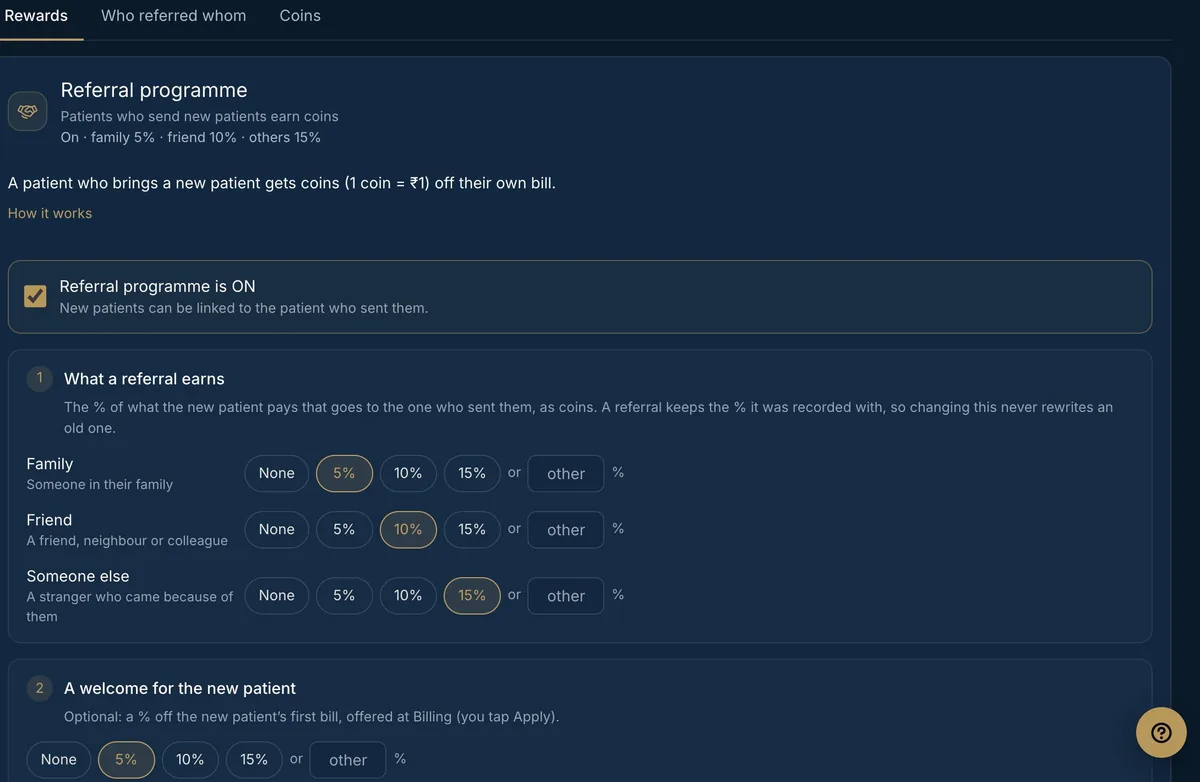
Set the rules once
You choose what a referral earns.
Pick a percentage for family, friends and strangers who came because of a patient. The one who sent them earns that share of what the new patient pays, as coins — and a referral keeps the percentage it was recorded with, so changing the rules never rewrites an old one.
At the counter
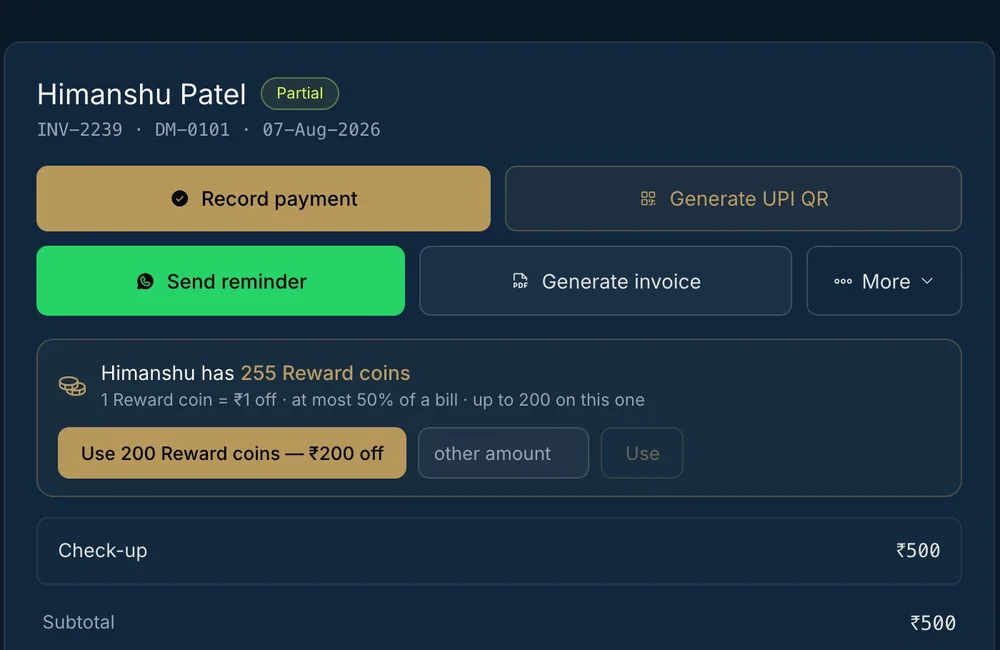
Coins show up when the bill is settled.
When a patient with coins is billed, the invoice says how many they have, how much can be used on this bill, and one tap applies them. The clinic decides how much of a bill coins may cover.
In the patient app
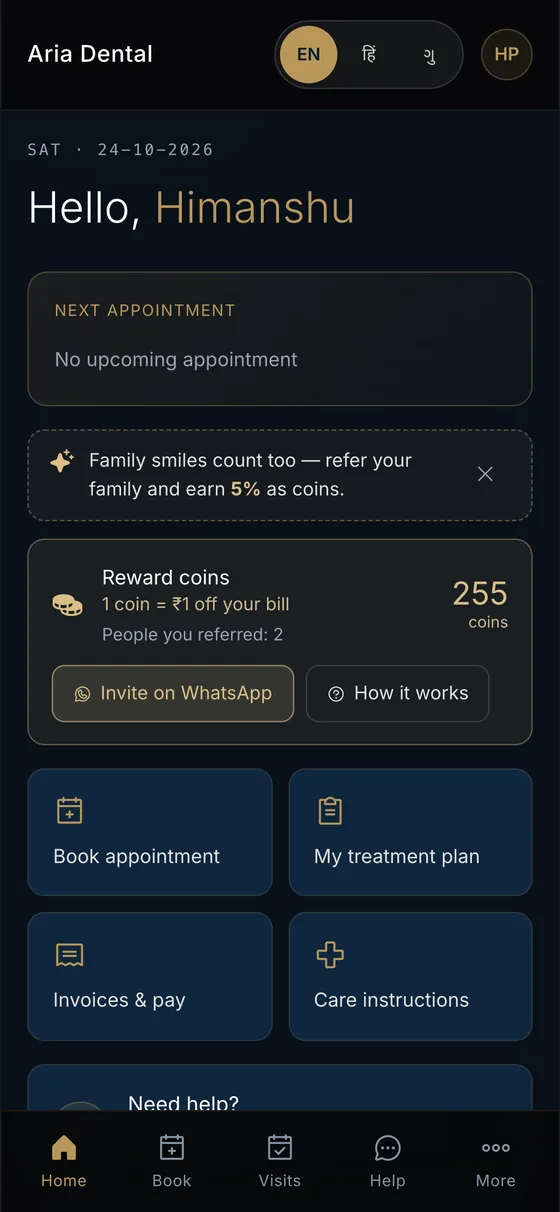
Patients see their coins — and invite in one tap.
Each family member sees their coins on the app’s Home screen, a friendly line about earning more, an Invite on WhatsApp button with a ready message, and How it works with your own percentages and limits. A monthly “Referral Notes” WhatsApp can go to patients who paid — off until the doctor turns it on.
Sent by
The new-patient form asks who sent them and how they are related, and says what the sender will earn.
Coin wallets
Who holds how many coins, what was earned and used, and a doctor’s correction when one is needed.
Counted in Reports
The Patients tab shows how many referrals came in, and which patients sent the most.
Reports
Every number explained — and what stands out.
Open Reports and the clinic’s month is already summarised in plain sentences, with the detail one tab away.
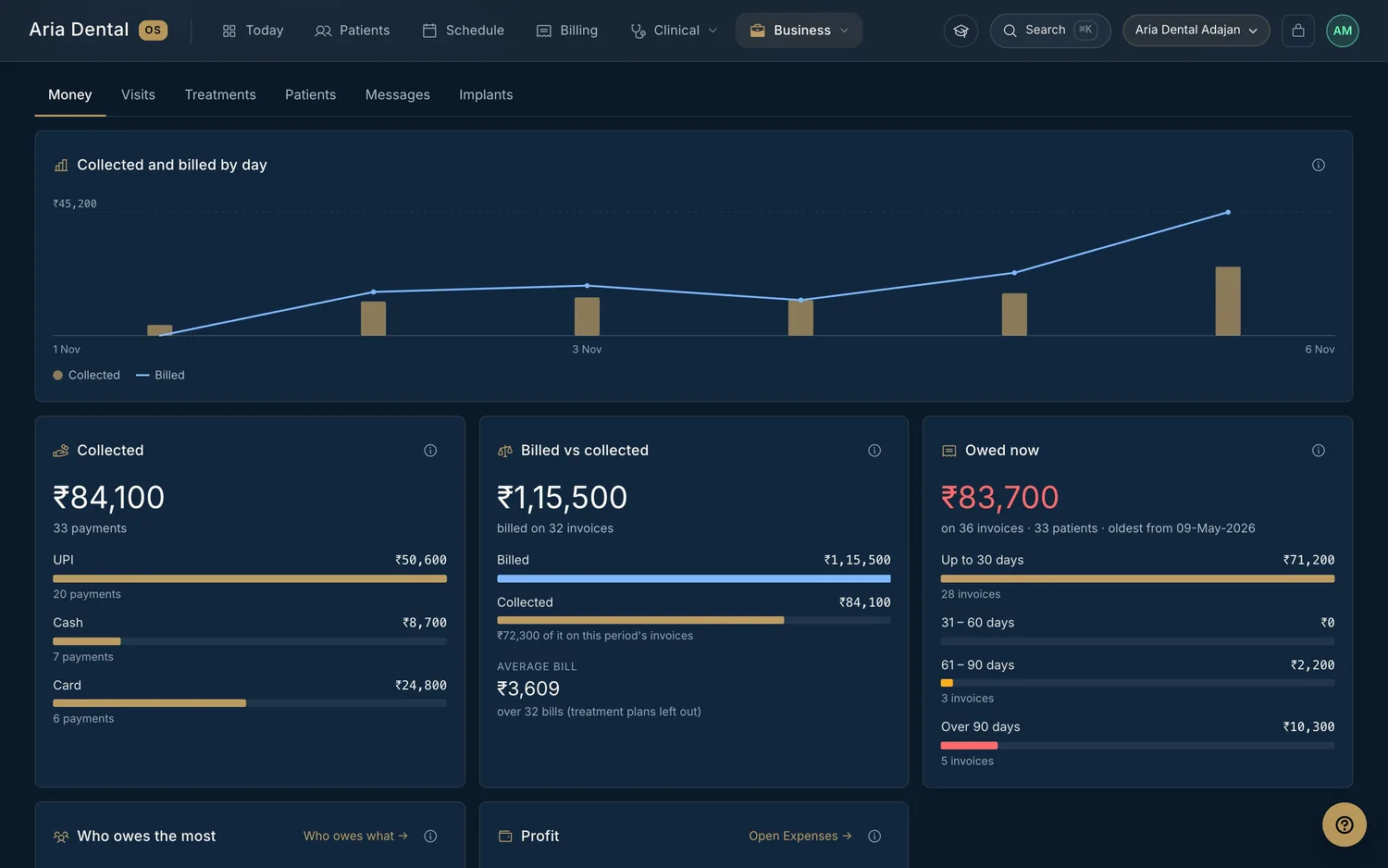
Money, plainly
Collected, owed and profit — and how each was counted.
See what was collected and billed by day, how much is still owed and for how long, who owes the most, and the profit after expenses. Every card has an ⓘ that says exactly how the number was worked out.
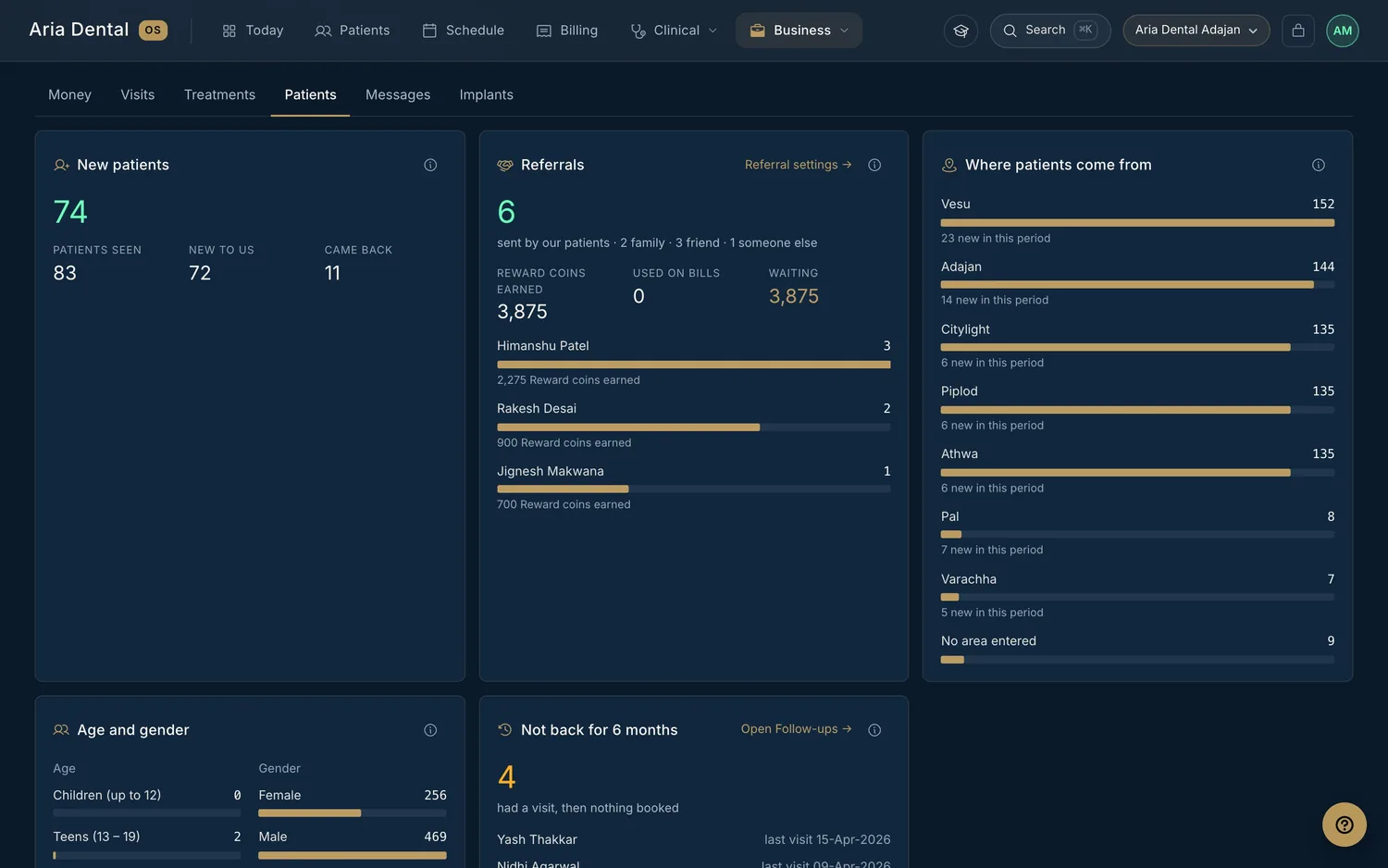
Know your patients
Where they come from, and who sends others.
New patients, the areas they come from, age and gender, who has not been back in six months, and a Referrals card for the programme above.
Make it yours
Set it up the way your clinic works — without leaving Settings.
Treatments and prices, medicines, consent forms, safety rules and what the assistant knows are edited in place, in the same screen.
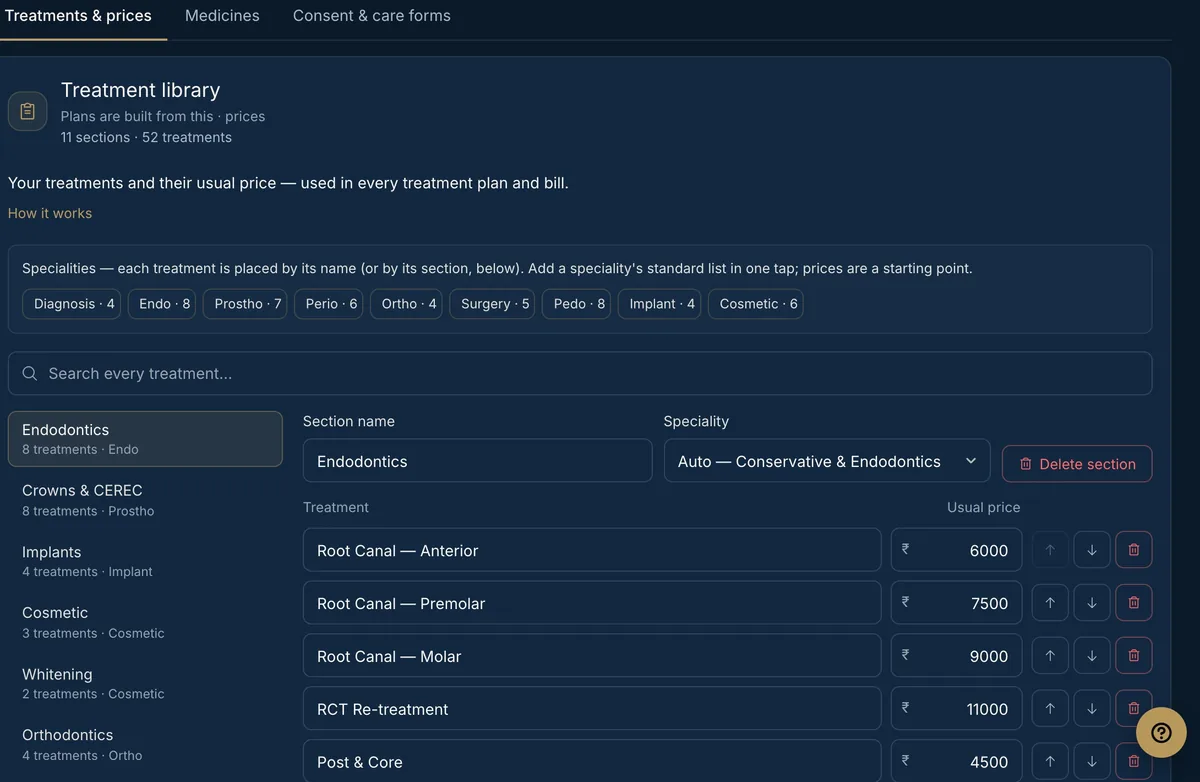
Your treatments and prices
Sections, treatments and usual prices — plans are built from this list, and a price change never rewrites a plan already made. Medicines and consent forms are edited here too.
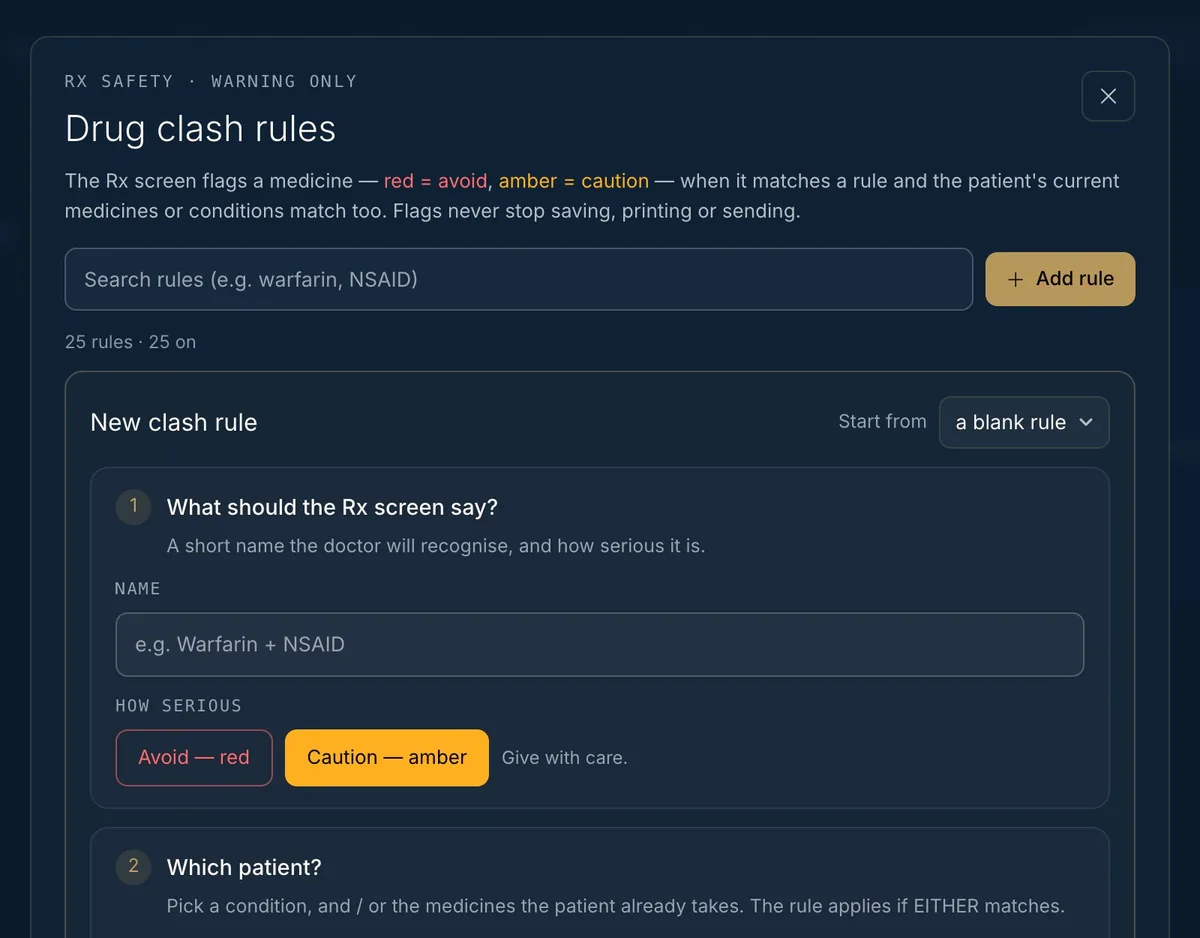
Your own safety rules
Add a drug clash rule in a few short steps, then test it. Rules only warn — they never stop saving, printing or sending.
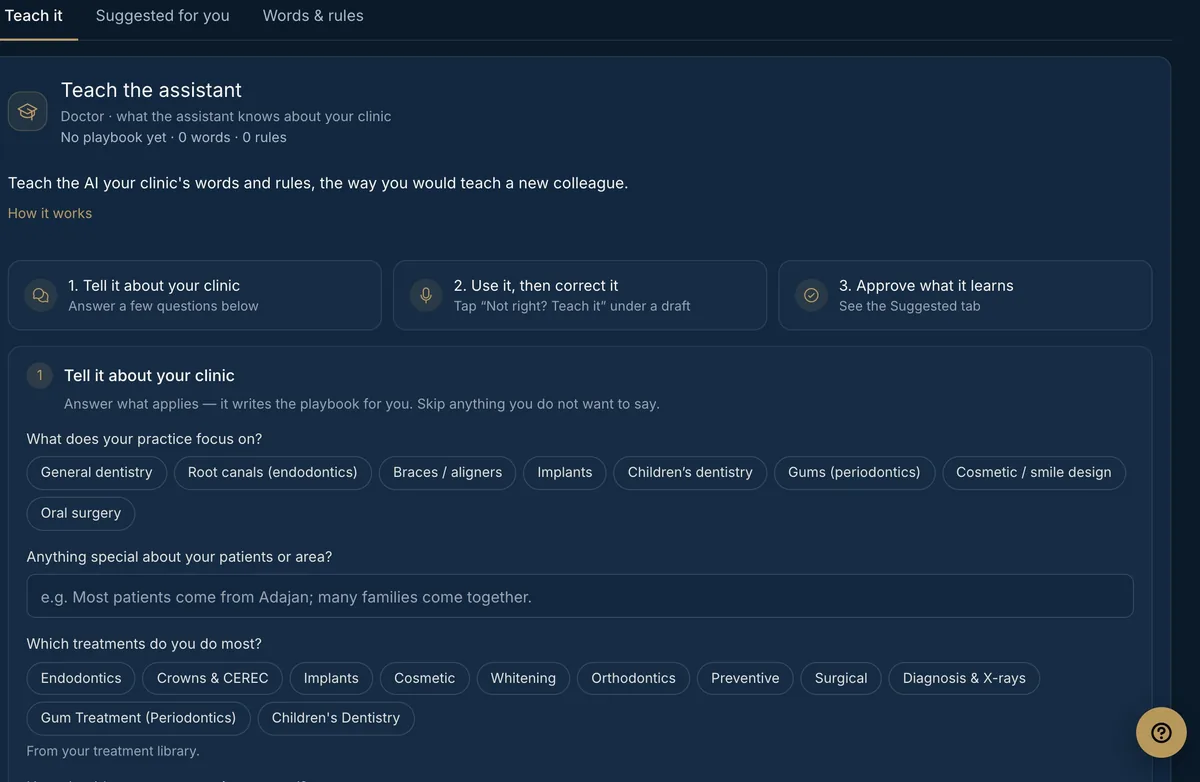
Teach the assistant your clinic
Answer a few questions or correct a draft once. It suggests words and rules it noticed — and nothing is used until you tap Add or Use.
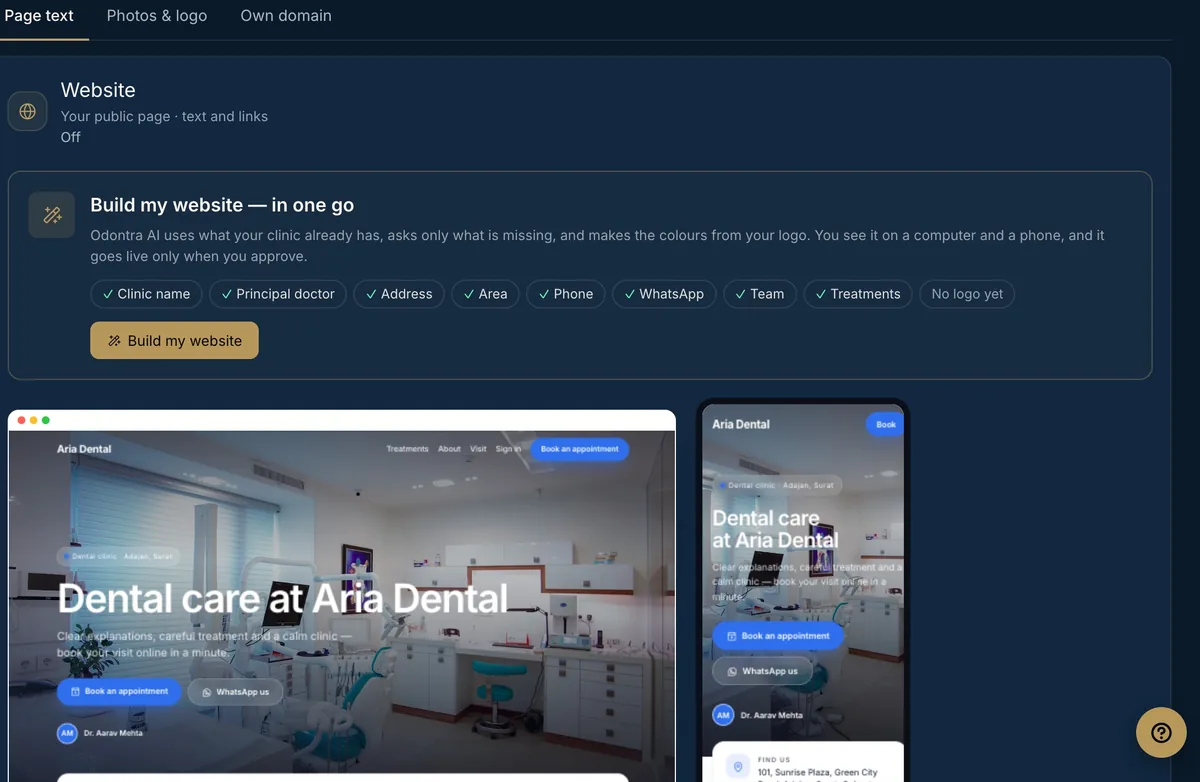
Your website, written with you
Answer a few questions and a page is drafted for you to read and edit. Nothing changes for the public until you press Save.
Team
Doctors and staff: profile, login and what each person can do — in tabs, so nothing is hidden.
Your look
Dark or light, a brand colour, text size and corner style, set once for the whole clinic.
Role protection
Choose who may change what, with an activity log of who did what, and when.
Run your whole clinic from one screen.
See the platform with your own schedule, chairs and treatments.